Author: aks0911

  • NumPy Essentials: Foundations of Numerical Python

    The Computational Engine Behind Modern Analytics

    In the previous page, you explored functions and vectorization—how to structure logic and how to scale computation. This page moves one level deeper into the system that makes large-scale numerical computation in Python possible: NumPy arrays.

    NumPy is not just another library. It is the computational backbone of most of the Python data ecosystem, including pandas, scikit-learn, statsmodels, and many deep learning frameworks. If you understand arrays properly, you understand how analytical computation truly works under the hood.

    This page focuses on building conceptual clarity around arrays, numerical operations, and mathematical thinking in vectorized environments.


    Why NumPy Exists

    Python lists are flexible but not optimized for high-performance numerical computing. They can store mixed data types, grow dynamically, and behave like general-purpose containers. However, this flexibility comes at a cost:

    • Higher memory usage
    • Slower arithmetic operations
    • Inefficient looping for large-scale numeric tasks

    NumPy arrays solve this by enforcing homogeneity and storing data in contiguous memory blocks. That design choice allows computation to be executed in optimized C code rather than pure Python.

    The result is dramatic speed improvement when working with numerical data.


    The NumPy Array as a Mathematical Object

    Conceptually, a NumPy array represents a vector or matrix in linear algebra.

    A one-dimensional array behaves like a vector:

    import numpy as np
    x = np.array([1, 2, 3])
    

    A two-dimensional array behaves like a matrix:

    A = np.array([[1, 2],
                  [3, 4]])
    

    Unlike lists, arrays support element-wise mathematical operations directly.

    For example:

    x * 2
    

    This multiplies every element in the vector by 2 without an explicit loop.

    At a deeper level, this is vectorized linear algebra.


    Shapes and Dimensions

    Every NumPy array has two key properties:

    • Shape – the dimensions of the array
    • ndim – the number of axes

    Understanding shape is critical in analytics because mismatched dimensions cause computational errors.

    For example:

    A.shape
    

    might return (2, 2) for a 2×2 matrix.

    In analytical workflows, shape determines:

    • Whether matrix multiplication is valid
    • How broadcasting will behave
    • Whether data is structured correctly for modeling

    Thinking in terms of dimensions is a transition from simple scripting to mathematical programming.


    Element-Wise Operations

    One of NumPy’s most important features is element-wise computation.

    If:

    x = np.array([1, 2, 3])
    y = np.array([4, 5, 6])
    

    Then:

    x + y
    

    produces:

    [5, 7, 9]
    

    This is not matrix addition in the abstract—it is vector addition applied element by element.

    Element-wise operations form the basis of:

    • Feature scaling
    • Residual calculations
    • Error metrics
    • Polynomial transformations

    They allow data scientists to operate on entire datasets in a single statement.


    Matrix Multiplication and Linear Algebra

    While element-wise operations are common, matrix multiplication follows different rules.

    The dot product of two vectors relates directly to geometric interpretation:

    This operation underpins regression, projection, similarity calculations, and many machine learning algorithms.

    In NumPy:

    np.dot(a, b)
    

    or

    A @ B
    

    performs matrix multiplication.

    Unlike element-wise multiplication, matrix multiplication follows strict dimensional constraints. This reinforces why understanding shapes is essential.


    Broadcasting Revisited

    Broadcasting allows arrays of different shapes to interact under specific compatibility rules.

    For instance:

    x = np.array([1, 2, 3])
    x + 5
    

    The scalar 5 expands automatically across the vector.

    More complex broadcasting occurs when combining arrays with dimensions such as (3, 1) and (1, 4).

    This mechanism is powerful because it eliminates the need for nested loops in multidimensional computations.

    In practical analytics, broadcasting is frequently used for:

    • Centering data by subtracting a mean vector
    • Normalizing rows or columns
    • Computing distance matrices

    Aggregations and Statistical Operations

    NumPy includes optimized aggregation functions:

    • mean()
    • sum()
    • std()
    • min()
    • max()

    These functions operate along specified axes.

    For example:

    A.mean(axis=0)
    

    computes column means.

    Axis-based operations are foundational in analytics because datasets are inherently two-dimensional: rows represent observations, columns represent features.

    When you specify an axis, you are defining the direction of reduction.


    Standardization and Z-Scores

    One of the most common transformations in analytics is standardization.

    With NumPy, this can be computed for an entire vector:

    z = (x - x.mean()) / x.std()
    

    No loops. No intermediate structures. Pure vectorized computation.

    This illustrates how mathematical formulas translate directly into array operations.

    The closer your code resembles the mathematical expression, the more readable and maintainable it becomes.


    Boolean Masking and Conditional Filtering

    Arrays can also store Boolean values. This enables conditional filtering:

    mask = x > 2
    x[mask]
    

    This extracts only elements that satisfy the condition.

    Boolean masking is one of the most powerful analytical tools because it allows selective transformation without explicit iteration.

    For example:

    x[x < 0] = 0
    

    This replaces negative values with zero.

    Such operations are common in cleaning pipelines.


    Performance and Memory Considerations

    NumPy arrays are stored in contiguous blocks of memory. This design improves cache efficiency and computational throughput.

    However, analysts must understand that:

    • Large arrays consume significant memory.
    • Some operations create intermediate copies.
    • In-place operations can reduce memory overhead.

    For example:

    x += 1
    

    modifies the array in place.

    In large-scale systems, memory efficiency becomes as important as computational speed.


    Linear Algebra in Analytics

    Many machine learning models are fundamentally linear algebra problems.

    For example, linear regression in matrix form can be represented as:

    Here:

    • \( X \) is the feature matrix
    • \( \beta \) is the parameter vector
    • \( \hat{y} \) is the prediction vector

    NumPy enables this computation directly using matrix multiplication.

    Understanding arrays allows you to see machine learning models not as “black boxes,” but as structured mathematical transformations.


    Reshaping and Structural Manipulation

    Sometimes data must be reshaped to fit modeling requirements.

    x.reshape(3, 1)
    

    Reshaping changes structure without changing underlying data.

    Structural operations include:

    • reshape()
    • transpose()
    • flatten()
    • stack()

    These are essential when preparing inputs for algorithms expecting specific dimensional formats.


    Numerical Stability and Precision

    Floating-point arithmetic is not exact. Small rounding errors accumulate.

    For example:

    0.1 + 0.2
    

    may not produce exactly 0.3.

    In analytical workflows, understanding floating-point precision is crucial when:

    • Comparing numbers
    • Setting convergence thresholds
    • Interpreting very small differences

    NumPy provides functions like np.isclose() to handle numerical comparisons safely.


    Conceptual Shift: From Rows to Arrays

    Beginners often think in terms of rows: “for each record, do this.”

    Advanced analysts think in arrays: “apply this transformation across the entire structure.”

    This shift dramatically simplifies logic and improves efficiency.

    Instead of writing:

    for row in dataset:
        process(row)
    

    You write vectorized expressions that operate across dimensions simultaneously.

    This is the core mindset of scientific computing.


    NumPy as the Foundation of the Ecosystem

    Most higher-level libraries build directly on NumPy arrays.

    • Pandas uses NumPy internally.
    • Scikit-learn models accept NumPy arrays.
    • Tensor-based frameworks rely on similar array abstractions.

    If you understand arrays deeply, you can transition across tools seamlessly.

    Without this foundation, higher-level libraries appear magical and opaque.


    Bringing It All Together

    NumPy arrays represent the convergence of:

    • Mathematics
    • Computer architecture
    • Software design
    • Analytical thinking

    They enable vectorization.
    They support linear algebra.
    They optimize performance.
    They enforce structural discipline.

    Mastering arrays is not about memorizing functions. It is about internalizing how numerical computation is structured.


    Transition to the Next Page

    In the next section, we will build on this foundation by exploring Pandas DataFrames and structured data manipulation.

    While NumPy handles raw numerical arrays, Pandas introduces labeled axes, tabular indexing, and relational-style operations—bridging the gap between mathematical computation and real-world datasets.

    You are now transitioning from computational fundamentals to structured data analytics.
  • Computational Efficiency: Principles for Scalable Analytics

    Writing Analytical Code That Scales

    As datasets grow larger and models become more complex, writing correct code is no longer sufficient. Efficiency becomes critical. An algorithm that runs in one second on a thousand rows may take hours on ten million. Understanding computational efficiency allows you to design analytical systems that scale.

    This page introduces the foundational ideas behind computational efficiency—time complexity, memory usage, algorithmic growth, and practical performance strategies in Python.

    The goal is not to turn you into a computer scientist, but to ensure you understand how computation behaves as data grows.


    Why Efficiency Matters in Analytics

    In small classroom examples, inefficiencies are invisible. But in production systems:

    • Data may contain millions of records.
    • Models may require repeated iterations.
    • Pipelines may execute daily or in real time.

    Inefficient computation leads to:

    • Slow dashboards
    • Delayed reports
    • Increased cloud costs
    • Model retraining bottlenecks

    Efficiency is not about optimization for its own sake—it is about scalability and reliability.


    Understanding Algorithmic Growth

    The central idea in computational efficiency is how runtime grows as input size increases.

    If we denote input size as \( n \), we analyze how execution time scales relative to \( n \).

    A simple linear function illustrates proportional growth:

    y = mx

    Slope (m)

    m = 1

    The slope controls how steep the line is.

    In linear time complexity (often written as \(O(n)\)), runtime increases proportionally with input size.

    If you double the dataset size, runtime roughly doubles.

    This is generally acceptable for analytics tasks.


    Constant, Linear, and Quadratic Time

    There are common categories of time complexity:

    Constant time (O(1))
    Runtime does not depend on input size. Accessing an array element by index is constant time.

    Linear time (O(n))
    Runtime grows proportionally with data size. Iterating once over a dataset is linear.

    Quadratic time (O(n²))
    Runtime grows with the square of input size. Nested loops over the same dataset often produce quadratic complexity.

    Quadratic growth behaves like:

    Quadratic Growth

    y = x²

    Scale Factor

    Scale: 1

    If input size doubles, runtime increases fourfold. This becomes catastrophic at scale.

    For example, a nested loop over 10,000 elements requires 100 million operations.

    Understanding this growth pattern helps you avoid performance pitfalls.


    Big-O Notation

    Big-O notation describes the upper bound of algorithmic growth as input size approaches infinity.

    It focuses on dominant growth terms, ignoring constants.

    For example:

    • \(O(n)\) ignores constant multipliers.
    • \(O(n² + n)\) simplifies to \(O(n²)\).

    In analytics, you rarely compute exact complexity formulas. Instead, you develop intuition:

    • Does this operation scan the data once?
    • Does it compare every element to every other element?
    • Does it repeatedly sort large datasets?

    This intuition guides design decisions.


    Loops vs Vectorization

    Earlier, you learned about vectorization. Now we understand why it matters computationally.

    A Python loop executes each iteration in the interpreter, adding overhead. A vectorized operation executes compiled code at the C level.

    For example:

    for i in range(len(data)):
        result[i] = data[i] * 2
    

    is typically slower than:

    result = data * 2
    

    The second operation leverages optimized low-level routines.

    The difference becomes dramatic for large arrays.

    Efficiency in analytics often means minimizing Python-level loops.


    Sorting Complexity

    Sorting appears frequently in data analysis—ranking, ordering, percentile computation.

    Most efficient sorting algorithms operate in \(O(n log n)\) time.

    Logarithmic growth increases much slower than linear growth:

    y = log(x)

    Log Scale Factor

    Scale = 1

    Adjust the scale to see how logarithmic growth changes.

    Combining linear and logarithmic growth produces manageable scaling even for large datasets.

    Understanding that sorting is more expensive than simple iteration helps you use it judiciously.


    Memory Efficiency

    Time is not the only constraint—memory usage is equally important.

    Large arrays consume memory proportional to their size. Creating multiple copies of a dataset doubles memory usage.

    Common inefficiencies include:

    • Unnecessary intermediate DataFrames
    • Converting data types repeatedly
    • Holding entire datasets in memory when streaming is possible

    In Python, copying large objects can significantly impact performance.

    In-place operations, when safe, can reduce memory overhead.


    Vectorized Aggregations vs Manual Computation

    Consider computing the mean manually:

    total = 0
    for x in data:
        total += x
    mean = total / len(data)
    

    This is O(n) time with Python loop overhead.

    Using NumPy:

    mean = data.mean()
    

    This is still \(O(n)\), but executed in optimized compiled code.

    The theoretical complexity remains linear, but practical performance differs significantly.

    Efficiency is not only about asymptotic growth—it is also about implementation details.


    Caching and Repeated Computation

    Recomputing expensive operations repeatedly wastes resources.

    For example, computing a column’s mean inside a loop for each row:

    for row in df:
        df["value"].mean()
    

    is highly inefficient because the mean is recalculated each time.

    Instead, compute once and reuse:

    mean_value = df["value"].mean()
    

    This eliminates redundant work.

    Efficiency often comes from restructuring logic rather than rewriting algorithms.


    Iterative Algorithms and Convergence

    Many machine learning algorithms are iterative. For example, gradient descent updates parameters repeatedly.

    A simplified update rule might resemble:

    If each iteration scans the entire dataset, runtime becomes:

    O(number_of_iterations × n)

    Improving convergence speed reduces total runtime.

    Efficiency in iterative systems depends on:

    • Learning rate selection
    • Convergence criteria
    • Batch vs stochastic updates

    These decisions affect computational cost directly.


    Data Structures and Access Patterns

    Choosing the right data structure affects performance.

    For example:

    • Lists allow fast append operations.
    • Dictionaries provide average constant-time lookups.
    • Sets enable efficient membership testing.

    In analytics pipelines, selecting appropriate structures can prevent unnecessary computational overhead.

    For example, checking membership in a list is O(n), but in a set is approximately O(1).

    Small design choices accumulate into significant performance differences.


    Parallelism and Hardware Awareness

    Modern systems often have multiple CPU cores.

    Some libraries automatically leverage parallel processing. Others require explicit configuration.

    While this course does not delve deeply into distributed systems, it is important to understand:

    • Some operations are CPU-bound.
    • Some are memory-bound.
    • Some can be parallelized effectively.

    Understanding bottlenecks helps you diagnose slow systems.


    When Premature Optimization Is Harmful

    Efficiency is important—but premature optimization can reduce readability and introduce complexity.

    The typical workflow is:

    1. Write clear, correct code.
    2. Measure performance.
    3. Optimize bottlenecks only.

    Profiling tools help identify slow sections.

    Optimization without measurement often wastes effort.


    Practical Guidelines for Analysts

    To maintain efficient analytical code:

    • Prefer vectorized operations over loops.
    • Avoid nested loops on large datasets.
    • Compute expensive values once.
    • Use built-in aggregation functions.
    • Be cautious with large temporary objects.

    These principles alone dramatically improve scalability.

    Efficiency is often about discipline rather than advanced theory.


    Connecting Efficiency to the Analytics Lifecycle

    Efficiency influences every stage of analytics:

    • Data ingestion must scale.
    • Cleaning pipelines must process large batches.
    • Feature engineering must avoid redundant work.
    • Model training must complete within acceptable time windows.

    As datasets grow, inefficient code becomes a bottleneck.

    Computational awareness transforms you from a script writer into a system designer.


    Conceptual Summary

    Computational efficiency rests on three pillars:

    1. Understanding how runtime scales with input size.
    2. Writing code that minimizes unnecessary operations.
    3. Leveraging optimized libraries instead of manual loops.

    Efficiency is not merely a technical detail—it directly affects feasibility, cost, and reliability.


    Next Page

    In the next section, we will move into Probability Foundations for Data Analytics.

    While computational efficiency ensures that systems scale, probability provides the theoretical framework for reasoning under uncertainty. Together, they form the backbone of modern data science.

    You are now transitioning from computational performance to mathematical reasoning.

  • Pandas DataFrames & Structured Data Manipulation

    From Numerical Arrays to Real-World Analytical Tables

    In the previous page, you explored NumPy arrays—the foundation of high-performance numerical computation. Arrays are powerful, but real-world datasets rarely arrive as pure matrices of numbers. They come as spreadsheets, CSV files, SQL tables, logs, or API responses. They contain column names, mixed data types, missing values, timestamps, and categorical variables.

    This is where Pandas becomes essential.

    Pandas builds on NumPy and introduces labeled, structured data containers that resemble relational tables. It allows you to move from raw numerical computation to applied data manipulation—the type required in almost every analytics workflow.

    This page develops a deep conceptual understanding of DataFrames, indexing, transformation logic, and structured operations.


    The DataFrame as a Concept

    A Pandas DataFrame is a two-dimensional, labeled data structure. Conceptually, it is a table with:

    • Rows representing observations
    • Columns representing variables (features)
    • Labels attached to both axes

    Unlike NumPy arrays, which are position-based, DataFrames support label-based access. This makes them more intuitive for working with structured datasets.

    For example:

    import pandas as pd
    
    df = pd.DataFrame({
        "Name": ["Alice", "Bob", "Charlie"],
        "Age": [25, 30, 35],
        "Salary": [50000, 60000, 70000]
    })
    

    Each column can have a different data type. This heterogeneity is crucial for real datasets, where numeric, categorical, and textual data coexist.


    Columns as Series

    Every column in a DataFrame is a Series, which is essentially a labeled NumPy array.

    When you select:

    df["Salary"]
    

    You receive a Series object.

    Understanding that a DataFrame is composed of multiple Series objects clarifies how operations work internally. Most column-wise operations are vectorized because they rely on NumPy arrays under the hood.

    This design balances performance with flexibility.


    Indexing and Selection

    DataFrames support two primary indexing mechanisms:

    • loc for label-based indexing
    • iloc for positional indexing

    For example:

    df.loc[0, "Salary"]
    

    accesses a value by row label and column label.

    df.iloc[0, 2]
    

    accesses the same value by position.

    This dual indexing model is powerful but requires conceptual clarity. Misunderstanding indexing is one of the most common beginner errors in Pandas.


    Filtering and Boolean Logic

    Structured datasets often require conditional filtering.

    For example:

    df[df["Age"] > 28]
    

    This expression creates a Boolean mask and returns only rows satisfying the condition.

    Behind the scenes, this is vectorized Boolean indexing—similar to what you saw in NumPy.

    Boolean filtering is foundational in analytics because it enables segmentation, cohort analysis, and targeted transformations.


    Creating New Columns

    Feature engineering often involves deriving new variables from existing ones.

    For example:

    df["Annual Bonus"] = df["Salary"] * 0.10
    

    This operation is vectorized across the entire column.

    Notice how the transformation resembles the mathematical expression directly. Clean, readable transformations are a hallmark of strong analytical code.


    Aggregation and Grouping

    Real-world data analysis often involves summarizing information across categories.

    For example:

    df.groupby("Department")["Salary"].mean()
    

    This performs:

    1. Grouping rows by a categorical variable
    2. Applying an aggregation function
    3. Returning summarized results

    Grouping is conceptually similar to SQL’s GROUP BY clause. It is central to descriptive analytics and business reporting.

    Aggregation functions commonly include:

    • mean
    • sum
    • count
    • median
    • standard deviation

    Understanding how grouping reshapes data is crucial for insight generation.


    Handling Missing Data

    Missing values are unavoidable in practical datasets.

    Pandas represents missing values as NaN. Several methods are available for handling them:

    • dropna() removes missing entries
    • fillna() replaces them
    • isnull() identifies them

    For example:

    df.fillna(0)
    

    Handling missing data requires analytical judgment. Blindly dropping rows can introduce bias. Filling values may distort distributions. Sound data practice involves understanding the source and impact of missingness.


    Sorting and Ranking

    Sorting enables ordering data based on specific columns:

    df.sort_values("Salary", ascending=False)
    

    Ranking operations are common in reporting dashboards and performance evaluation contexts.

    These operations are computationally efficient and leverage optimized internal algorithms.


    Merging and Joining

    In practice, data rarely exists in a single table. It is distributed across multiple sources.

    Pandas supports relational-style merging:

    pd.merge(df1, df2, on="EmployeeID")
    

    This operation combines datasets based on a shared key.

    Understanding joins is essential for:

    • Data integration
    • Multi-source analytics
    • Feature enrichment

    Improper joins can silently introduce duplication or data loss, so conceptual precision is critical.


    Time Series Handling

    Many analytics problems involve temporal data. Pandas provides specialized tools for time-based indexing.

    For example:

    df["Date"] = pd.to_datetime(df["Date"])
    df.set_index("Date", inplace=True)
    

    Once indexed by time, you can:

    • Resample data
    • Compute rolling averages
    • Extract year/month/day components

    Rolling averages are particularly important in smoothing volatile signals.

    For instance, conceptually a moving average relates to smoothing behavior similar to analyzing trends in continuous functions:

    Although a rolling average is not strictly linear regression, trend interpretation often begins with linear approximations.

    Time-aware computation is essential in forecasting, anomaly detection, and financial analytics.


    Vectorized Transformations vs Apply

    Pandas provides the .apply() function, which applies custom logic row-wise or column-wise. However, excessive use of .apply() can degrade performance because it reintroduces Python-level loops.

    Whenever possible, prefer vectorized operations.

    For example, instead of:

    df["Squared"] = df["Value"].apply(lambda x: x**2)
    

    Use:

    df["Squared"] = df["Value"] ** 2
    

    This distinction becomes increasingly important as datasets scale.


    Descriptive Statistics and Exploration

    Pandas provides built-in summary statistics:

    df.describe()
    

    This produces:

    • Count
    • Mean
    • Standard deviation
    • Minimum
    • Quartiles
    • Maximum

    Such summaries form the first layer of exploratory data analysis (EDA).

    Quantitative summaries are often interpreted using statistical concepts like the standard score:

    Understanding how these metrics are computed reinforces statistical literacy within programming workflows.


    DataFrame as an Analytical Pipeline Component

    A DataFrame is not just storage—it is an intermediate stage in a larger system.

    A typical workflow may involve:

    1. Loading raw data
    2. Cleaning and filtering
    3. Engineering features
    4. Aggregating and summarizing
    5. Exporting for modeling

    Each transformation produces a new structured representation.

    Well-designed pipelines avoid modifying data unpredictably and instead build transformations step by step.


    Performance Considerations

    While Pandas is powerful, it is not infinitely scalable. For very large datasets, memory constraints become critical.

    Best practices include:

    • Avoiding unnecessary copies
    • Selecting only required columns
    • Using categorical data types where appropriate
    • Leveraging vectorized methods

    Understanding these considerations prepares you for large-scale analytics systems.


    Conceptual Integration

    At this point in the course, you have moved through:

    • Core Python structures
    • Functions and abstraction
    • Vectorized computation
    • NumPy arrays
    • Structured DataFrames

    You are transitioning from “learning syntax” to “engineering data transformations.”

    Pandas is the bridge between computational mathematics and real-world datasets.

    It enables you to express complex analytical logic cleanly, efficiently, and reproducibly.


    Transition to the Next Page

    In the next section, we will explore Exploratory Data Analysis (EDA) & Data Visualization.

    If NumPy provides mathematical power and Pandas provides structured manipulation, visualization provides interpretation. You will learn how to translate structured tables into graphical representations that reveal patterns, trends, and anomalies.

    This marks the shift from data preparation to data understanding.

  • Vectorization and Functional Design in Data Science

    Writing Reusable Logic and Scaling Computation in Python

    As analytics problems grow in complexity, two ideas become essential for writing clean and efficient code: functions and vectorization. Functions help you organize and reuse logic. Vectorization helps you apply that logic efficiently to entire datasets. Together, they shift your mindset from writing scripts to building computational systems.

    In this page, we move from basic Python constructs toward analytical programming discipline—where performance, abstraction, and scalability matter.


    Functions as Analytical Abstractions

    At its core, a function is a reusable block of logic. But in analytics, functions are more than a convenience—they are the primary way we formalize transformations.

    Consider a simple mathematical relationship such as a linear model:

    Linear Function Visualizer

    Slope (m): 1

    Intercept (b): 0

    This equation defines a transformation: given an input ( x ), we compute an output ( y ). In programming terms, this relationship becomes a function.

    Instead of rewriting the formula repeatedly, we encapsulate it:

    def linear_model(x, m, b):
        return m * x + b
    

    The function now represents a reusable computational rule. In analytics workflows, this pattern appears everywhere:

    • Data normalization functions
    • Feature engineering transformations
    • Custom evaluation metrics
    • Business rule calculations
    • Data cleaning pipelines

    Functions allow you to treat logic as a modular component rather than scattered instructions.


    Parameters, Return Values, and Generalization

    A well-designed function does not depend on global variables or hardcoded values. It receives inputs (parameters), processes them, and returns outputs.

    This separation is crucial in analytics because:

    1. It makes experiments reproducible.
    2. It enables testing.
    3. It allows automation across datasets.

    For example, suppose you want to standardize a numeric feature using the z-score transformation:

    \[
    z = \frac{x - \mu}{\sigma}
    \]

    We can express this computational rule using a function:

    def standardize(x, mean, std):
        return (x - mean) / std
    

    The function is abstract—it works for any dataset once the appropriate parameters are supplied. In practice, you would compute the mean and standard deviation from training data and apply the same transformation to validation data.

    This pattern—compute parameters, then apply transformation—is foundational in machine learning pipelines.


    Scope and Purity

    Understanding scope is essential when writing analytical functions. Variables created inside a function exist only within that function. This isolation prevents accidental interference between computations.

    In analytics, side effects (unexpected changes in external variables) can introduce subtle bugs. Therefore, writing pure functions—functions that depend only on inputs and return outputs without modifying external state—is considered best practice.

    A pure function improves:

    • Debugging clarity
    • Reproducibility
    • Parallelization potential
    • Unit testing feasibility

    As analytical systems scale, this discipline becomes non-negotiable.


    Functions as First-Class Objects

    In Python, functions are first-class objects. This means they can be:

    • Assigned to variables
    • Passed as arguments
    • Returned from other functions

    This capability enables higher-order programming. For instance, we can define a function that applies another function to data:

    def apply_transformation(data, func):
        return func(data)
    

    Now any transformation function can be passed into this structure.

    This is conceptually important in analytics because many libraries operate this way. For example, optimization routines accept objective functions. Machine learning frameworks accept loss functions. Data processing frameworks apply transformation functions across partitions.

    Understanding this abstraction prepares you for more advanced analytical tooling.


    Lambda Functions and Concise Transformations

    Sometimes we need lightweight functions for temporary use. Lambda expressions allow inline function definitions:

    square = lambda x: x**2
    

    This is particularly useful in data manipulation operations where transformation logic is simple and local.

    However, for complex analytics workflows, explicit named functions are preferable for readability and maintainability.


    The Computational Limitation of Loops

    When working with small datasets, looping over elements is straightforward:

    result = []
    for value in data:
        result.append(value * 2)
    

    However, this approach does not scale well. As datasets grow to millions of rows, Python-level loops become inefficient due to interpreter overhead.

    This is where vectorization becomes transformative.


    What Is Vectorization?

    Vectorization means applying an operation to an entire array or dataset at once, rather than iterating element by element in Python.

    Instead of writing:

    result = []
    for x in data:
        result.append(2 * x)
    

    We use:

    result = 2 * data
    

    If data is a NumPy array or Pandas Series, this computation is executed in optimized C-level code, making it dramatically faster.

    Vectorization is not just syntactic convenience—it is a computational optimization strategy.


    Why Vectorization Is Faster

    There are three major reasons vectorized operations outperform loops:

    1. Compiled backend execution – Libraries like NumPy use optimized C implementations.
    2. Reduced interpreter overhead – Python does not evaluate each element individually.
    3. Memory efficiency – Vectorized operations leverage contiguous memory blocks.

    In large-scale analytics, performance gains can be orders of magnitude.


    Vectorization with NumPy

    Suppose we want to compute the quadratic transformation:

    f(x) = 1x² + 0x + 0

    a = 1

    b = 0

    c = 0

    \[
    f(x) = ax^2 + bx + c
    \]

    Using loops, we would compute this value for each element. With vectorization:

    import numpy as np
    
    x = np.array([1, 2, 3, 4])
    a, b, c = 2, 3, 1
    
    result = a * x**2 + b * x + c
    

    The expression applies to the entire array simultaneously.

    This is the foundation of numerical computing in Python.


    Broadcasting: Implicit Vector Expansion

    Broadcasting is a powerful feature that allows operations between arrays of different shapes, provided they are compatible.

    For example:

    x = np.array([1, 2, 3])
    x + 5
    

    Here, the scalar 5 is automatically “broadcast” across all elements.

    This concept extends to multidimensional arrays and forms the backbone of matrix operations in machine learning.


    Vectorization in Pandas

    Pandas builds on NumPy and extends vectorized operations to tabular data.

    Instead of:

    df["new_column"] = df["old_column"].apply(lambda x: x * 2)
    

    We prefer:

    df["new_column"] = df["old_column"] * 2
    

    The second approach is faster and more idiomatic.

    In general, avoid .apply() for element-wise arithmetic if a vectorized expression exists.


    Vectorized Conditional Logic

    Conditional transformations can also be vectorized.

    Using NumPy:

    import numpy as np
    np.where(x > 0, x, 0)
    

    This replaces negative values with zero in a fully vectorized manner.

    Using Pandas:

    df["flag"] = df["sales"] > 1000
    

    This creates a Boolean column efficiently without explicit loops.

    Vectorized conditionals are central to feature engineering pipelines.


    Mathematical Thinking in Vectorized Systems

    Many analytical transformations can be represented as vector operations. For instance, normalization, scaling, polynomial expansion, and aggregation all map naturally to vectorized computation.

    Consider the Pythagorean relationship:

    Pythagorean Theorem

    a² + b² = c²

    a: 3

    b: 4

    a² + b² =

    c = √(a² + b²) ≈

    c² ≈

    In a vectorized environment, we could compute distances across entire arrays of coordinates simultaneously rather than processing each point individually.

    This approach transforms how we conceptualize computation: instead of “for each row,” we think “for the entire column.”


    When Not to Vectorize

    Despite its advantages, vectorization is not always the solution. It may not be suitable when:

    • The logic depends on sequential state changes.
    • Operations require complex branching.
    • Memory constraints prevent large intermediate arrays.

    In such cases, optimized loops, list comprehensions, or specialized libraries may be preferable.

    Understanding trade-offs is part of computational maturity.


    Functions + Vectorization = Scalable Pipelines

    The most powerful pattern in analytics combines both concepts.

    You define reusable transformation functions and apply them in a vectorized manner to datasets.

    For example:

    def scale_column(series):
        return (series - series.mean()) / series.std()
    
    df["scaled_feature"] = scale_column(df["feature"])
    

    Here:

    • The function encapsulates logic.
    • The operation executes vectorized.
    • The pipeline remains readable and scalable.

    This pattern generalizes to feature engineering modules, preprocessing layers, and modeling workflows.

    Performance Mindset in Analytics

    At beginner levels, correctness is enough. At intermediate levels, readability matters. At advanced levels, performance and abstraction dominate.

    Functions provide abstraction.
    Vectorization provides performance.

    Mastering both moves you from writing scripts to designing systems

    Conceptual Transition

    By understanding functions, you learn to structure computation.
    By understanding vectorization, you learn to scale computation.

    Together, they enable:

    • Efficient feature engineering
    • High-performance numerical computation
    • Clean, modular data pipelines
    • Production-ready analytical systems

    This marks a shift from “coding for small exercises” to “engineering analytical workflows.”


    Next Page Preview

    In the next section, we will build on these ideas by exploring NumPy fundamentals and array mathematics in depth—where vectorization becomes not just a technique but the default computational paradigm.

    Understanding arrays at a structural level will deepen your grasp of how Python achieves high-performance numerical computing and will prepare you for advanced statistical and machine learning operations.


  • Python Foundations for Data Analytics

    A Practical Programming Foundation for Data Analysis

    Python has become the dominant programming language in modern analytics—not because it is the most complex or the most mathematically sophisticated, but because it strikes a powerful balance between readability, flexibility, and computational capability. For students entering the world of data analysis, learning Python is less about becoming a software engineer and more about acquiring a precise, expressive tool for thinking with data.

    This page is designed to build your foundation in Python specifically for analytics. The focus is not on advanced software architecture or application development. Instead, we concentrate on the core programming concepts you will repeatedly use when cleaning datasets, transforming variables, computing metrics, and preparing data for modeling.

    By the end of this lesson, you should understand how Python operates at a structural level and how its fundamental concepts connect directly to analytical workflows.


    Why Python Is Central to Modern Analytics

    Before diving into syntax, it is important to understand why Python is so widely adopted in analytics environments.

    Python offers several characteristics that make it ideal for data work:

    • Readable syntax that resembles plain English.
    • Extensive ecosystem of libraries for statistics, visualization, and machine learning.
    • Strong community support and continuous development.
    • Interoperability with databases, cloud systems, and APIs.
    • Scalability from small scripts to production systems.

    In practical terms, Python allows analysts to:

    • Load and manipulate large datasets.
    • Perform statistical analysis.
    • Create reproducible workflows.
    • Visualize patterns and distributions.
    • Build predictive models.

    When working in environments such as Jupyter Notebook, Python becomes an interactive analytical workspace where code, output, and explanations coexist in a structured manner.


    Variables and Data Types in an Analytical Context

    At its core, Python revolves around variables—named containers that store data values. In analytics, variables often represent real-world measurements such as revenue, age, temperature, category labels, or timestamps.

    Core Data Types You Must Master

    While Python supports many data types, analytics primarily relies on the following:

    • Integers (int) – Whole numbers (e.g., 10, 42, -3)
    • Floats (float) – Decimal numbers (e.g., 3.14, 99.9)
    • Strings (str) – Text values (e.g., “January”, “Customer_A”)
    • Booleans (bool) – Logical values (TrueFalse)

    Understanding data types is critical because operations depend on them. For example:

    • Mathematical operations apply to integers and floats.
    • Concatenation applies to strings.
    • Logical filtering relies on boolean expressions.

    A common beginner mistake in analytics is failing to recognize mismatched types—such as treating numeric data stored as text. Being deliberate about data types prevents subtle computational errors.


    Core Data Structures for Analytics

    In real datasets, you rarely work with single values. You work with collections of values. Python provides built-in data structures that form the foundation for handling structured data.

    Lists

    Lists are ordered collections of values and are extremely common in analytics.

    They are useful for:

    • Storing sequences of measurements.
    • Collecting results of computations.
    • Iterating over multiple values.

    Example use cases:

    • Daily sales values.
    • Temperature readings.
    • User counts over time.

    Tuples

    Tuples are similar to lists but immutable (cannot be modified after creation). They are often used when values should remain constant.

    Common analytical use:

    • Representing coordinates (x, y).
    • Returning multiple outputs from a function.

    Dictionaries

    Dictionaries store data as key–value pairs. This structure is powerful for representing structured records.

    Example:

    • {“name”: “Alice”, “age”: 30}
    • {“product”: “Laptop”, “price”: 1200}

    Dictionaries are conceptually important because they mirror how tabular data organizes information—each field (column) corresponds to a labeled key.

    Sets

    Sets store unique values and are useful for:

    • Removing duplicates.
    • Performing intersection and union operations.
    • Identifying distinct categories.

    Mastery of these structures prepares you for higher-level tools like pandas DataFrames.


    Operators and Expressions

    Operators allow you to perform calculations and comparisons.

    Arithmetic Operators

    • Addition (+)
    • Subtraction (-)
    • Multiplication (*)
    • Division (/)
    • Floor division (//)
    • Exponentiation (**)
    • Modulus (%)

    These are used for:

    • Computing averages.
    • Calculating growth rates.
    • Normalizing values.

    Comparison Operators

    • Equal to (==)
    • Not equal (!=)
    • Greater than (>)
    • Less than (<)
    • Greater than or equal (>=)
    • Less than or equal (<=)

    These operators produce boolean values and are foundational for filtering and conditional logic.

    Logical Operators

    • and
    • or
    • not

    Logical operators allow compound conditions such as filtering rows where revenue > 1000 and region == “North”.

    Understanding these operators deeply enables expressive analytical queries.


    Conditional Logic and Decision Structures

    In analytics, decision rules are everywhere. You often need to classify values based on thresholds or categories.

    Python provides conditional statements using ifelif, and else.

    Applications in analytics include:

    • Categorizing performance levels.
    • Flagging anomalies.
    • Assigning labels based on criteria.

    Example conceptual logic:

    • If revenue > 10,000 → classify as “High”
    • Else → classify as “Standard”

    This conditional thinking is fundamental in feature engineering and rule-based systems.


    Iteration: Automating Repetitive Tasks

    Real datasets contain thousands or millions of records. Manually processing each value is impossible.

    Python supports repetition through:

    • for loops
    • while loops

    For Loops

    Used when iterating over:

    • Lists
    • Dictionaries
    • Ranges of numbers

    Example analytical applications:

    • Computing total revenue.
    • Transforming values.
    • Aggregating statistics.

    While Loops

    Used when repetition continues until a condition is met.

    Though loops are powerful, modern analytics often favors vectorized operations through libraries like pandas and NumPy for efficiency. However, understanding loops builds the mental model required for advanced techniques.


    Functions: Writing Reusable Analytical Logic

    Functions allow you to encapsulate logic into reusable blocks.

    Why functions matter in analytics:

    • Prevent code repetition.
    • Improve readability.
    • Support modular design.
    • Enhance reproducibility.

    A well-written analytical script often consists of multiple small functions, each responsible for one clear task.

    For example:

    • A function to calculate growth rate.
    • A function to clean text.
    • A function to normalize numerical columns.

    Functions transform scattered scripts into structured analytical pipelines.


    Error Handling and Debugging

    Data rarely behaves perfectly. Files may be missing, values may be null, and formats may be inconsistent.

    Python provides structured error handling using:

    • try
    • except
    • finally

    This allows your code to handle unexpected situations gracefully.

    Example applications:

    • Skipping corrupted rows.
    • Handling missing files.
    • Managing division by zero errors.

    Learning to interpret error messages is a core skill. Debugging is not a failure—it is a normal part of analytical work.


    Working with External Data

    Analytics rarely involves hard-coded values. Most work begins by importing data from external sources.

    Common formats include:

    • CSV files
    • Excel spreadsheets
    • JSON files
    • Databases

    Python provides tools for loading these formats, especially through pandas.

    Understanding file paths, directories, and relative vs absolute paths is part of becoming comfortable in an analytical environment.


    Introduction to NumPy and pandas

    While core Python builds your foundation, analytics becomes powerful when combined with libraries.

    NumPy

    NumPy enables:

    • Efficient numerical computation.
    • Multi-dimensional arrays.
    • Vectorized mathematical operations.

    It is the backbone of scientific computing in Python.

    pandas

    pandas introduces the DataFrame—a tabular structure similar to a spreadsheet or SQL table.

    With pandas, you can:

    • Filter rows.
    • Select columns.
    • Group data.
    • Compute aggregations.
    • Handle missing values.
    • Merge datasets.

    For analytics students, pandas becomes the primary working tool.


    Writing Clean and Readable Code

    Professional analytics requires more than correct outputs—it requires readable and maintainable code.

    Best practices include:

    • Meaningful variable names.
    • Clear function definitions.
    • Logical structuring.
    • Avoiding unnecessary complexity.
    • Adding comments where appropriate.

    Readable code supports collaboration and reproducibility.


    Reproducibility and Workflow Discipline

    Analytics is not just about obtaining insights; it is about being able to reproduce them.

    Python encourages reproducibility by:

    • Allowing scripts to be rerun.
    • Supporting version control.
    • Integrating with notebooks.
    • Enabling modular workflows.

    A disciplined workflow includes:

    • Clear data loading steps.
    • Transparent transformations.
    • Explicit calculations.
    • Organized output generation.

    This discipline distinguishes hobby coding from professional analytics.


    From Python Basics to Analytical Thinking

    Learning Python for analytics is not simply learning syntax. It is developing computational thinking.

    You learn to:

    • Break problems into smaller components.
    • Translate questions into logical conditions.
    • Structure repetitive processes efficiently.
    • Validate assumptions through code.

    Python becomes a language for reasoning about data.


    Common Beginner Mistakes to Avoid

    As you build your foundation, avoid these common pitfalls:

    • Ignoring data types.
    • Hardcoding values unnecessarily.
    • Writing overly complex logic.
    • Not checking intermediate outputs.
    • Neglecting readability.

    Awareness of these mistakes accelerates learning.


    Preparing for the Next Modules

    By mastering Python essentials, you prepare yourself for:

    • Exploratory Data Analysis (EDA)
    • Statistical modeling
    • Machine learning
    • Data visualization
    • Feature engineering
    • Deployment workflows

    The confidence gained here reduces cognitive load later when topics become mathematically or technically advanced.


    Conclusion

    Python Essentials for Analytics is not about memorizing syntax—it is about building a structured way of thinking with data. Variables, data types, loops, conditionals, and functions are not isolated programming topics. They are the building blocks of analytical reasoning.

    When you understand Python at this foundational level, libraries like pandas and NumPy stop feeling intimidating. Instead, they become logical extensions of concepts you already grasp.

    In the modules ahead, you will apply these fundamentals to real datasets, uncover patterns, build models, and interpret results. But everything begins here—with a clear understanding of how Python operates as the analytical engine behind modern data work.

    Next: Foundations of Data Structures in Python for Analytics

  • Foundations of Data Structures in Python for Analytics

    A Conceptual and Practical Foundation in Python

    Data structures are the architecture of analytical thinking in Python. Before visualization, before modeling, and even before statistical reasoning, there is a more fundamental question: 

    Types of Data

    How is the data organized in memory? The answer to this question determines how efficiently you can manipulate information, how clearly you can express logic, and how scalable your workflow becomes.

    In analytics, data structures are not abstract programming concepts. They directly influence how datasets are represented, transformed, and interpreted. When you clean a dataset, filter values, group categories, or compute aggregates, you are interacting with underlying structures that define how information is stored and retrieved.

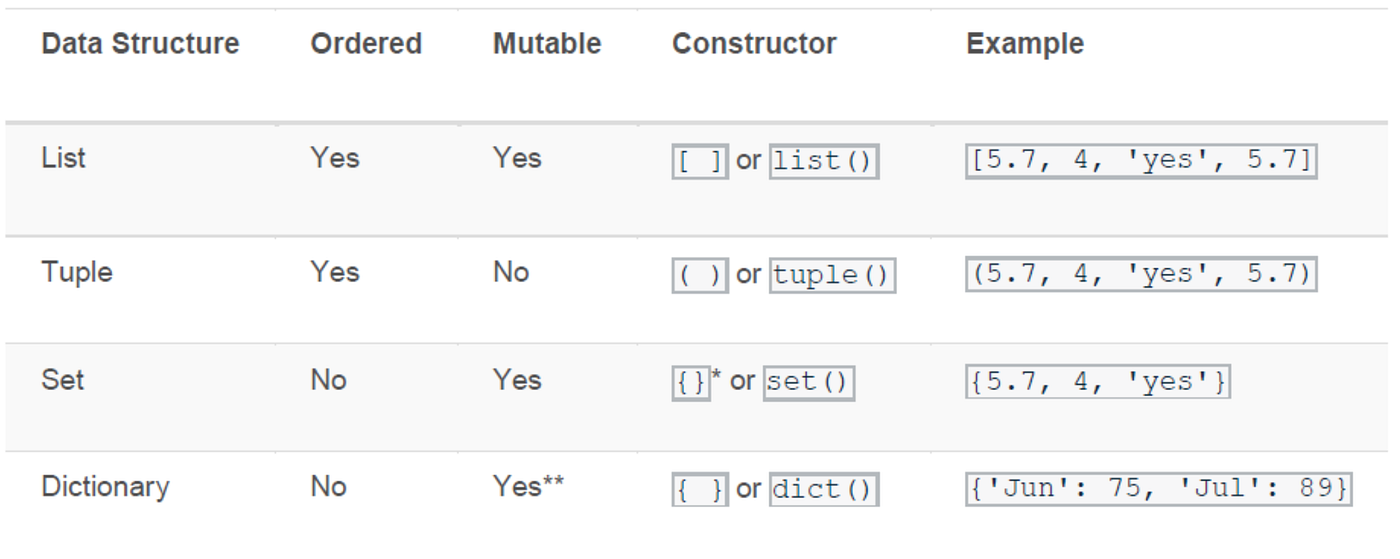
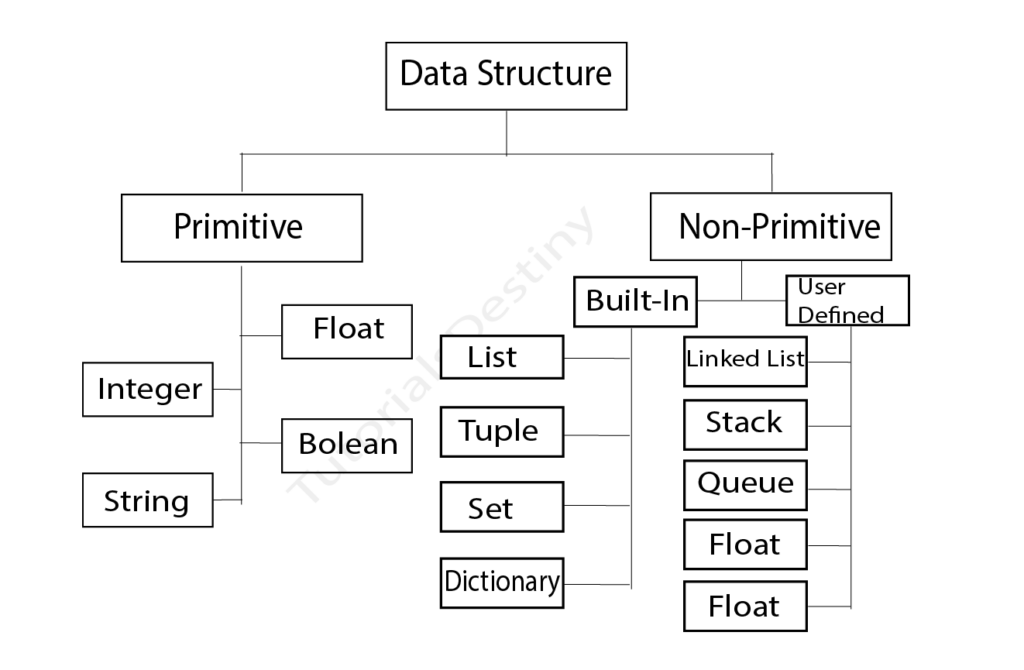
    This page develops a deep understanding of Python’s core data structures—lists, tuples, dictionaries, and sets—from an analytical perspective. The objective is not only to understand their mechanics, but to understand their strategic role in data work.


    The Role of Data Structures in Analytical Workflows

    Every dataset, regardless of size, must be represented internally in some structured format. Whether you are analyzing a small CSV file or working with large-scale machine learning pipelines, your analysis depends on how data is arranged.

    Image

    Data structures influence:

    • How easily you can access elements
    • How efficiently you can modify values
    • How clearly your logic maps to real-world meaning
    • How well your code scales

    Poor structural decisions lead to tangled logic and unnecessary complexity. Strong analytical programmers deliberately choose structures that align with the shape and purpose of their data.


    Lists: Ordered Collections for Sequential Data

    A list is an ordered, mutable collection of elements. It preserves sequence, which makes it naturally suited for representing time-based or position-based information.

    In analytics, lists frequently appear when dealing with:

    • Time series observations
    • Sequential measurements
    • Aggregated results from computations
    • Iterative transformations

    Because lists preserve order, they align well with real-world data that unfolds across time or follows a logical progression.

    One of the most important characteristics of lists is mutability. You can add, remove, or modify elements dynamically. This flexibility is useful when collecting values during iteration or building intermediate results during preprocessing.

    However, lists also have limitations. They do not enforce uniform data types, nor do they provide labeled access to elements. Access relies on positional indexing, which can reduce clarity when datasets grow complex.

    From an analytical standpoint, lists are often an initial container—a staging structure before data is converted into more structured forms like arrays or DataFrames.


    Tuples: Stability and Immutability

    Tuples resemble lists in that they are ordered collections. The crucial difference is that tuples are immutable. Once created, their contents cannot be altered.

    Immutability has conceptual importance in analytics. It signals that a collection represents a fixed logical unit. For example, a coordinate pair (latitude, longitude) or a configuration parameter set should not change during computation.

    Using tuples communicates intent: this data should remain stable. That stability can prevent accidental modification and reinforce logical clarity.

    Although tuples are less frequently used than lists in day-to-day analysis, they are essential in situations where data integrity is critical or when returning multiple values from functions.

    In practical terms, tuples support structured thinking by distinguishing between flexible collections and fixed entities.


    Dictionaries: Representing Structured Records

    Dictionaries are arguably the most analytically expressive of Python’s built-in structures. They store data as key–value pairs, allowing direct access through meaningful labels rather than numeric positions.

    This mirrors how structured data is conceptualized in real-world datasets. Consider a customer record:

    • Name
    • Age
    • Location
    • Purchase history

    In dictionary form, each attribute becomes a key mapped to its corresponding value. This labeled access dramatically improves clarity compared to positional indexing.

    Dictionaries are particularly powerful in analytics because they:

    • Provide fast lookups
    • Allow semantic labeling of data
    • Support nested structures
    • Align naturally with JSON and API responses

    Many modern data pipelines involve ingesting JSON data, which maps directly into dictionaries or lists of dictionaries. Understanding dictionaries is therefore foundational for real-world data integration.

    Nested dictionaries allow hierarchical representation, such as region → country → city → metrics. While powerful, nested structures require disciplined organization to avoid excessive complexity.

    In many ways, dictionaries form the conceptual bridge between raw Python structures and higher-level tabular systems.


    Sets: Managing Uniqueness and Comparison

    A set is an unordered collection of unique elements. Unlike lists, sets automatically eliminate duplicates.

    In analytics, uniqueness is often a central concern. You may need to identify distinct categories, remove duplicate identifiers, or compare overlapping groups.

    Sets excel in these scenarios because they support mathematical set operations such as:

    • Union (combining elements)
    • Intersection (common elements)
    • Difference (elements in one set but not another)

    These operations become valuable when comparing customer segments, product categories, or experiment groups.

    However, sets do not preserve order and do not allow indexed access. Their purpose is conceptual clarity around uniqueness and membership testing rather than sequential processing.


    Structural Thinking in Analytical Practice

    The choice of data structure is rarely random. It should reflect the analytical objective.

    If your task involves ordered observations, a list may be appropriate. If you require labeled attributes, a dictionary provides clarity. If uniqueness is central, a set becomes ideal. If stability is necessary, a tuple reinforces immutability.

    Strong analysts begin by asking: What is the logical structure of this data? Only then do they choose a container.

    This structural awareness reduces code complexity and improves interpretability.


    Iteration Across Structures

    In analytics, iteration allows you to apply logic across collections of values. Whether computing totals, transforming categories, or filtering based on conditions, iteration connects structure to computation.

    Lists and tuples are typically iterated sequentially. Dictionaries allow iteration over keys, values, or both. Sets can also be iterated, though without guaranteed order.

    Understanding iteration patterns enables you to:

    • Compute aggregates
    • Transform raw inputs
    • Apply classification rules
    • Validate data integrity

    Even when later transitioning to vectorized operations in pandas or NumPy, the mental model of iteration remains essential.


    Combining Data Structures

    Real analytical workflows rarely rely on a single structure. Instead, they involve combinations.

    For example, a dataset might initially appear as a list of dictionaries, where each dictionary represents a record. Alternatively, you may encounter a dictionary of lists, representing column-oriented storage.

    These combinations reflect different perspectives on the same dataset:

    • Row-oriented representation
    • Column-oriented representation

    Recognizing these perspectives prepares you for understanding tabular data systems.


    From Core Structures to Tabular Analytics

    Higher-level libraries like pandas build upon these fundamental ideas. A DataFrame can be conceptualized as a structured system combining labeled columns, indexed rows, and efficient storage mechanisms.

    When you understand Python data structures deeply, the transition to pandas feels natural rather than abrupt.

    You begin to see that:

    • Columns resemble structured sequences
    • Rows resemble dictionaries
    • Indexes provide labeled positioning

    The abstraction becomes understandable because the foundation is clear.


    Performance and Memory Awareness

    While beginners focus primarily on clarity, understanding performance considerations becomes increasingly important as datasets scale.

    Lists are dynamic and flexible but can become inefficient for heavy numerical computation. Dictionaries provide fast lookups but consume additional memory. Sets offer efficient uniqueness operations. Tuples are lightweight and stable.

    As your analytical projects grow in size, these differences influence execution speed and resource usage.

    Performance awareness does not mean premature optimization—it means understanding the structural trade-offs of each choice.


    Common Structural Pitfalls

    Analytical beginners often encounter recurring structural issues:

    • Using lists when labeled access is needed
    • Overcomplicating nested dictionaries
    • Forgetting that sets are unordered
    • Confusing positional indexing with semantic labeling

    These mistakes typically arise from insufficient structural planning. Taking time to design data representation before analysis prevents such errors.


    Data Structures as Cognitive Tools

    Ultimately, data structures are not just storage mechanisms. They shape how you conceptualize problems.

    When you use dictionaries, you think in terms of labeled attributes. When you use lists, you think in terms of sequences. When you use sets, you think in terms of membership and comparison.

    This alignment between structure and cognition strengthens analytical reasoning.


    Preparing for Advanced Applications

    Mastering data structures prepares you for:

    • Data cleaning and transformation
    • Feature engineering
    • Statistical computation
    • Machine learning pipelines
    • Scalable analytical systems

    Every advanced analytical workflow rests on the disciplined use of foundational structures.

    When learners struggle with pandas or machine learning libraries, the difficulty often stems not from the advanced tools themselves, but from a weak understanding of underlying structures.


    Conclusion

    Data structures are the structural grammar of analytical programming. They determine how information is organized, accessed, and transformed. Lists manage sequences. Tuples enforce stability. Dictionaries provide labeled structure. Sets ensure uniqueness.

    Learning them is not a programming formality—it is the beginning of disciplined analytical thinking.

    As you progress into more advanced topics, these structures will remain present—sometimes visible, sometimes abstracted. Mastering them now ensures clarity, efficiency, and confidence in every future analytical task.