Author: aks0911

  • Beyond Bits and Bytes: Understanding Quantum Computing

    Introduction

    A quantum computer is a type of computing device that utilizes the principles of quantum mechanics to perform computational operations. Unlike classical computers, which use bits to represent either 0 or 1, quantum computers use quantum bits or qubits. Qubits can exist in multiple states simultaneously, this property is known as superposition. This along with entanglement and quantum parallelism, allows quantum computers to process information in ways that classical computers cannot, potentially enabling them to solve certain problems much more efficiently.

    What is a Qubit?

    Quantum bits (Qubits) are units to store information in Quantum computers as bits does in classical computers.

    BitsQubits
    Bits are the basic unit of information in classical computers.Qubits are basic unit of information in quantum computers.
    Bits exist in two states either ‘0’ or ‘1’.Qubits can exist in either ‘0’ or ‘1’ or a linear combination of both.
    This system of storing or displaying information is quite stableQuantum bits are highly unstable in nature.
    State of bits cab be determined at a given point of time.State of Qbits could not be determined.
    Bits do not naturally exist in a superposition states. Additionally, classical bits operate independently of each other.Qubits exhibits the propery of superposition and quantum entanglement.
    Classical computers powered by bits, operate sequentially.Qbit powered quantum computer can perform parallel computing.
    Bits are represented using bulbs, and transistors.Qubits are implemented using Superconducting circuits, trapped ions and Quantum dots.

    Quantum Parallelism

    Quantum parallelism is a unique feature of quantum computing that allows quantum systems, particularly qubits, to exist in multiple states simultaneously. In classical computing, a bit can be in a state of 0 or 1 at any given time. However, a qubit, due to the principle of superposition, can exist in a superposition of 0 and 1 simultaneously.

    This property enables quantum computers to perform computations on all possible combinations of a set of qubits at once. As a result, quantum algorithms can explore a vast solution space concurrently, providing a significant advantage for certain types of calculations. Quantum parallelism allows quantum computers to potentially solve problems exponentially faster than classical computers for specific tasks, such as factoring large numbers, searching databases, and solving certain optimization problems.

    Quantum parallelism is one of the factors that contributes to the potential superiority of quantum computers for specific computational problems.

    Quantum Entanglement

    Quantum entanglement is a quantum phenomenon in which two or more particles become correlated in such a way that the state of one particle is directly related to the state of another, regardless of the distance between them. This correlation persists even when the entangled particles are separated by large distances across the universe.

    Key characteristics of quantum entanglement include:

    1. Instantaneous Correlation: Changes to the state of one entangled particle instantaneously affect the state of the other, violating the classical concept of locality.
    2. Non-locality: The entangled particles can be far apart, and their correlation occurs faster than the speed of light, seemingly transcending the constraints of classical information transfer.
    3. Quantum States: Entanglement typically involves particles, such as electrons or photons, existing in a combined quantum state. The quantum states of entangled particles are interdependent.

    Quantum entanglement plays a crucial role in quantum information processing, quantum teleportation, and quantum cryptography. It is a fundamental aspect of quantum mechanics and is often considered one of the most perplexing and intriguing features of the quantum world.

    Quantum Algorithm

    Algorithms designed to run on quantum computers, taking advantage of the unique principles of quantum mechanics to perform certain computations more efficiently than classical algorithms are termed as Quantum algorithms.

    These algorithms exploit unique properties of qubits to solve certain problems more efficiently than classical algorithms. For example, Shor’s algorithm is a famous quantum algorithm that efficiently factors large integers, a problem that is believed to be intractable for classical computers. Another example is Grover’s algorithm, which can search an unsorted database quadratically faster than classical algorithms.

    These algorithms often involve intricate quantum operations such as quantum gates, quantum Fourier transforms, and quantum phase estimation. While quantum algorithms hold promise for solving certain problems faster than classical algorithms, quantum computers are still in the early stages of development, and significant challenges remain in building large-scale, error-corrected quantum computers.

    Challenges in the field of Quantum Computing

    Despite their potential, quantum computers face significant challenges:

    • Decoherence: Quantum states are fragile and can be easily disturbed by the environment, leading to errors.
    • Error Correction: Developing methods to correct errors in quantum computations is a major area of ongoing research.
    • Scalability: Building a large-scale, fault-tolerant quantum computer is extremely challenging and requires advancements in both hardware and software.
  • The Wonders of Artificial Intelligence: Explore The World of AI

    Artificial Intelligence

    To understand Artificial Intelligence (AI), first we will discuss the concept of intelligence. Knowledge and intelligence are two different things; knowledge means to know, whereas intelligence is the application of knowledge to solve problems using algorithms.

    The word ‘Artificial’ in the term Artificial Intelligence refers to something created by humans, as opposed to natural intelligence. AI is intelligence exhibited by machines. It mimics cognitive functions like learning and problem-solving, typically associated with human intelligence.

    Some notable examples of AI applications include advanced search engine algorithms like Google, Natural Language Processing (NLP) technologies such as Siri and Alexa, and self-driving vehicles that are transforming the automotive industry.

    Types Of Artificial Intelligence

    • Weak or Narrow Artificial Intelligence: AI designed for specific tasks, like self-driving cars and voice assistants (Siri, Alexa), falls under this category. It’s the most common form of AI in use today, particularly in automation and customer service applications.
    • Artificial General Intelligence (AGI): AGI refers to the theoretical concept of AI systems possessing human-like cognitive abilities across multiple domains. It remains a future goal for AI researchers.

    Wonders Of Artificial Intelligence

    • Automation: AI is capable of automating repetitive tasks, leading to increased business productivity and cost savings. Examples include AI-driven manufacturing processes and customer support systems.
    • AI-Powered Accessibility: AI improves accessibility for people with disabilities, such as through real-time translation or tools that assist individuals with visual impairments.
    • AI in Transportation: AI optimizes traffic systems and powers autonomous vehicles, enhancing both public safety and transportation efficiency.
    • Natural Language Processing (NLP): NLP allows machines to understand and generate human language, powering virtual assistants like Siri and Alexa, along with AI-driven chatbots used in customer support.
    • Healthcare Advancements: AI is revolutionizing healthcare by assisting in diagnostics, personalizing treatment plans, and predicting patient outcomes. It also aids in analyzing medical images and performing surgeries with precision.
    • Enhanced Creativity: AI is contributing to the creation of artificial art, music generation, and literature. Tools like DALL-E and GPT-4 generate creative outputs from simple prompts.
    • Predictive Analytics: AI helps businesses by analyzing large data sets to predict future trends, optimize decision-making, and streamline supply chain management.

    Challenges and Concerns of AI

    • Job Automation: The rise of AI automation poses threats to low-skilled jobs, with AI outperforming humans in repetitive tasks, resulting in widespread job displacement.
    • Loss of Human Skills: Relying too heavily on AI could lead to a decline in human creativity and decision-making abilities.
    • Environmental Impact: The energy demands of large AI models and data centers can negatively impact the environment, contributing to climate change.
    • Misinformation: AI tools can be used to create deepfakes and spread misinformation, which can undermine public trust and destabilize democratic systems.
    • AI Arms Race: The development of AI-powered autonomous weapons raises ethical and security concerns. The race to develop these technologies may have far-reaching consequences for global security.

    Machine learning vs Deep learning

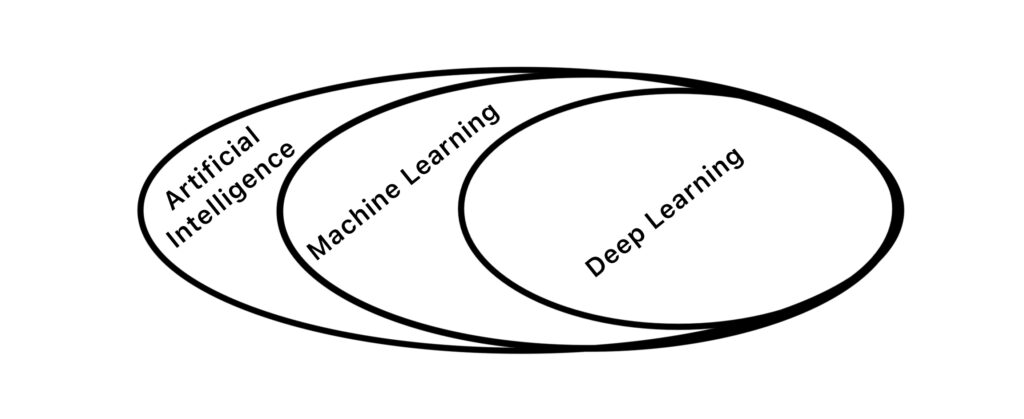
    Deep learning and machine learning both falls under the umbrella of Artificial Intelligence, but they represent distinct approaches to train AI systems. The primary distinction lies in their training data, machine learning typically relies on smaller, structured datasets, whereas deep learning leverages larger, unstructured datasets.

    Machine learning enable computers to learn from and make predictions or decisions based on data. Wheras Deep learning utilizes deep neural networks, which are algorithms inspired by the structure of the human brain. These networks have many layers, allowing them to automatically learn representations of data.

    Machine Learning Deep Learning
    It uses various algorithms like Decision Trees, k-Nearest Neighbors etc.It primarily uses Deep Neural Networks (DNNs)
    It requires manual selection and engineering of features.It automatically learns relevant features from raw unstructured data.
    ML relies on structured data.Capable of handling unstructured and high-dimensional data effectively.
    Many ML models are interpretable.DL models are less interpretable due to their complex neural network.
    It generally reuires less computational resourcesRequires significant computational resources
    It is generally trained on smaller datasets.Large unstructured dataset is required to train such complex models
    Its area of application includes finance, healthcare, marketing and more.It is particularly powerful in tasks like image and speech recognition, natural language processing, and autonomous systems

    Ethical considerations

    AI ethical considerations encompass a set of principles and guidelines that guide the development, deployment, and use of artificial intelligence technologies in a responsible and morally sound manner. These considerations aim to address potential societal, legal, and individual impacts of AI systems. Key aspects of AI ethical considerations includes the following:

    • Transparency
    • Fairness and bias
    • Accountability
    • Safety
    • Privacy
    • Human-Centric Design
    • Inclusivity
    • Regulatory Compliance

    By prioritizing these ethical considerations, developers can contribute to the responsible and sustainable growth of AI technologies, fostering trust among users and addressing societal concerns.

    Start a Free course on Artificial Intelligence

    from Basics to Advance level

  • Windows Keyboard Shortcuts: Boost Your Productivity

    Windows Keyboard Shortcuts: Boost Your Productivity

    Why Use Windows Keyboard Shortcuts?

    In today’s fast-paced digital world, efficiency matters more than ever. Whether you are a student preparing assignments, a teacher creating notes, an office professional handling documents, or a casual computer user browsing the internet, the way you interact with your computer can significantly impact your productivity. One of the simplest yet most powerful ways to work faster on a Windows computer is by using keyboard shortcuts.

    Keyboard shortcuts are combinations of keys that perform specific actions instantly. Instead of navigating through menus or relying heavily on a mouse, you can complete tasks with just a few keystrokes. Over time, these shortcuts become muscle memory, allowing you to work smoothly and effortlessly.

    Using keyboard shortcuts reduces your reliance on the mouse, enabling you to navigate, manage files, and perform tasks more efficiently. This not only saves time but also minimizes unnecessary hand movement, which can reduce fatigue and repetitive strain injuries. Many professionals who spend long hours on computers prefer keyboard shortcuts because they make work faster, cleaner, and more precise.

    Another major advantage of keyboard shortcuts is consistency. Most shortcuts work across multiple applications—text editors, browsers, file managers, and even professional software. Once you learn them, you can apply the same skills everywhere, making you a confident and power user of Windows.

    Below are some essential Windows keyboard shortcuts, carefully grouped by category, to help you boost productivity and take full control of your system.

    General Shortcuts

    General keyboard shortcuts are the foundation of everyday computer use. These shortcuts work across most Windows applications and are essential for tasks such as editing text, managing files, and navigating documents.

    For example, copying and pasting text is something almost everyone does daily. Using Ctrl + C, Ctrl + X, and Ctrl + V allows you to move information instantly without opening menus. Similarly, undo and redo shortcuts help you quickly fix mistakes, which is especially useful while writing, designing, or coding.

    These shortcuts are universal and should be the first ones every Windows user learns.

    Ctrl + CCopy selected item(s) to the clipboard
    Ctrl + XCut selected item(s) to the clipboard
    Ctrl + VPaste item(s) from the clipboard
    Ctrl + ZUndo the last action
    Ctrl + YRedo the last action
    Ctrl + ASelect all items in a document or window
    Ctrl + SSave the current document or file
    Ctrl + NOpen a new window or document
    Ctrl + FOpen the “Find” window to search for text
    Ctrl + PPrint the current document
    Alt + TabSwitch between open windows or applications
    Alt + F4Close the active window or application
    Ctrl + Alt + DelOpen the security options menu
    Ctrl + Shift + EscOpen Task Manager directly

    Why these shortcuts matter:

    • They reduce errors by giving you better control.
    • They save seconds on each task, which adds up to hours over time.
    • They work almost everywhere—Word, Excel, browsers, and even basic apps.

    Mastering these shortcuts alone can dramatically improve your day-to-day workflow.

    Taskbar Shortcuts

    The Windows taskbar is the control center of your desktop experience. Taskbar shortcuts allow you to open applications, manage windows, and access system tools without leaving your keyboard.

    For instance, pressing Windows Key + E instantly opens File Explorer, saving you multiple clicks. Windows Key + D is incredibly useful when your screen is cluttered with open windows—you can instantly show or hide the desktop.

    These shortcuts are especially helpful when multitasking or working with multiple applications simultaneously.

    Windows Key + EOpen file explorer
    Windows Key + DShow or hide the desktop
    Windows Key + TabOpen Task View to switch between open windows
    Windows Key + ROpen the Run dialog box
    Windows Key + MMinimise all windows
    Windows Key + Shift + MRestore minimised windows
    Windows Key + LLock your computer to ensure security
    Windows Key + TCycle through taskbar applications
    Windows Key + Number (1-9)Open corresponding app pinned to the taskbar based on its position

    Practical use case:

    If you pin your most-used apps (browser, Word, Excel) to the taskbar, you can open them instantly using Windows Key + number, without touching the mouse.

    Virtual Desktop Shortcuts

    Virtual desktops are one of Windows’ most underrated features. They allow you to create multiple desktops for different tasks—work, study, browsing, or entertainment—without cluttering a single screen.

    Using keyboard shortcuts makes managing virtual desktops fast and seamless.

    Windows Key + Ctrl + DCreate a new virtual desktop
    Windows Key + Ctrl + F4Close the current virtual desktop
    windows Key + Ctrl + ⬅️/ ➡️ Switch between virtual desktops

    Why virtual desktops improve productivity:

    • Separate work and personal tasks
    • Reduce distractions
    • Keep related applications grouped together

    For example, you can keep your browser and notes on one desktop and design or coding tools on another.

    Accessibility Shortcuts

    Windows offers excellent accessibility features to help users with visual, auditory, or motor challenges. These keyboard shortcuts make Windows easier to use for everyone, not just those with disabilities.

    Windows Key + U
    Open the Accessibility settings.
    Windows Key + + (Plus)
    Open the Magnifier to zoom in
    Windows Key + – (Minus)
    Zoom out using the Magnifier
    Windows Key + Enter
    Open the Narrator
    Windows Key + Ctrl + C
    Turn colour filters on or off
    Shift + 5 (Num Lock)
    Enable/disable Mouse Keys for moving the cursor with the numeric keypad.

    Who benefits most:

    • Users with low vision
    • Elderly users
    • Users with limited mouse control

    These shortcuts show how Windows prioritizes inclusivity and ease of access.

    Browser Shortcuts

    Web browsers are among the most used applications on any computer. Browser shortcuts help you navigate faster, manage tabs efficiently, and focus on content.

    Ctrl + T
    Open a new tab
    Ctrl + W
    Close the current tab
    Ctrl + Shift + T
    Reopen the last closed tab
    Ctrl + Tab
    Switch to the next tab
    Ctrl + Shift + Tab
    Switch to the previous tab
    Ctrl + L
    Focus the address bar
    F11
    Enter or exit full-screen mode

    Why browser shortcuts are essential:

    • Ideal for research and study
    • Helps manage multiple tabs efficiently
    • Saves time while searching and browsing

    Students and professionals who research online daily will find these shortcuts extremely valuable.

    Advanced System Commands

    Advanced system shortcuts give you quick access to system-level settings and tools. These are particularly useful for power users, IT professionals, and advanced learners.

    Windows Key + Pause/Break
    Open the System Properties window
    Windows Key + I
    Open the Settings menu
    Windows Key + X
    Open the Quick Link menu (right-click Start menu)
    Windows Key + Shift + S
    Take a screenshot of a selected area using the Snipping Tool
    Windows Key + P
    Switch display modes (e.g., duplicate, extend, or second screen only)
    Windows Key + Space
    Switch input language or keyboard layout

    These shortcuts allow you to troubleshoot issues, manage displays, and customize your system without navigating complex menus.

    Conclusion

    Keyboard shortcuts are not just tricks for advanced users—they are essential tools for anyone who wants to use Windows efficiently. Learning shortcuts is an investment that pays off every single day by saving time, reducing effort, and improving accuracy.

    You don’t need to memorize everything at once. Start with a few shortcuts that match your daily tasks. As they become second nature, gradually add more to your skill set.

    Start small—pick a few keyboard shortcuts to learn each week. Once they become second nature, add more to your repertoire. With practice, you’ll wonder how you ever worked without them!

  • Say Hello to DragGAN – Generative Image Editing AI

    Say Hello to DragGAN – Generative Image Editing AI

    Introduction

    Introducing DragGAN, the latest sensation to captivate the internet following the triumph of chatbots like ChatGPT, Bard, and DALL.E (a revolutionary AI image generation tool). Developed by a collaborative team of researchers from Google, Max Planck Institute for Informatics, and MIT, DragGAN has arrived to revolutionise generative image editing.

    DragGAN: Unleash Your Creative Power with Revolutionary AI Image Editing

    With DragGAN, anyone can effortlessly edit images like a seasoned professional, without the need for complex and cumbersome Photo editing software. This innovative tool, driven by the power of generative AI, allows users to unleash their creativity through a simple point-and-drag interface.

    DragGAN

    At its core, DragGAN (Interactive Point-based Manipulation on the Generative Image Manifold) harnesses the remarkable capabilities of a pre-trained GAN. By faithfully adhering to user input while maintaining the boundaries of realism, this method sets itself apart from previous approaches. Gone are the days of relying on domain-specific modeling or auxiliary networks. Instead, DragGAN introduces two groundbreaking components: a latent code optimization technique that progressively moves multiple handle points towards their intended destinations, and a precise point tracking procedure that faithfully traces the trajectory of these handle points. Leveraging the discriminative qualities found within the intermediate feature maps of the GAN, DragGAN achieves pixel-perfect image deformations with unprecedented interactive performance.

    Be ready to embark on a new era of image editing as DragGAN paves the way for intuitive and powerful point-based manipulation on the generative image manifold.

    Its white paper has been released and code will be made public in jun 2023.

    DragGAN Demo

    DragGAN | Author={Pan, Xingang and Tewari, Ayush, and Leimk{\”u}hler, Thomas and Liu, Lingjie and Meka, Abhimitra and Theobalt, Christian},

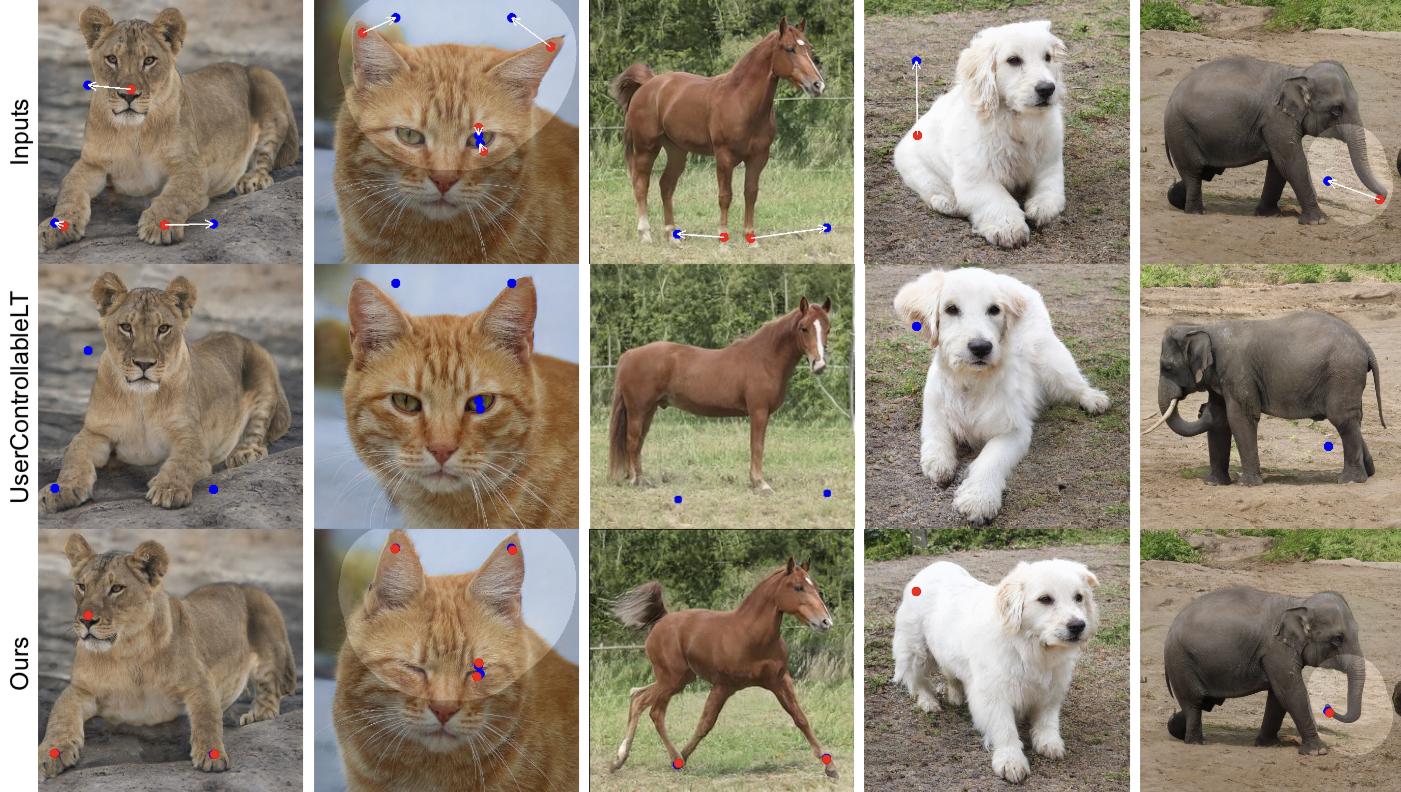
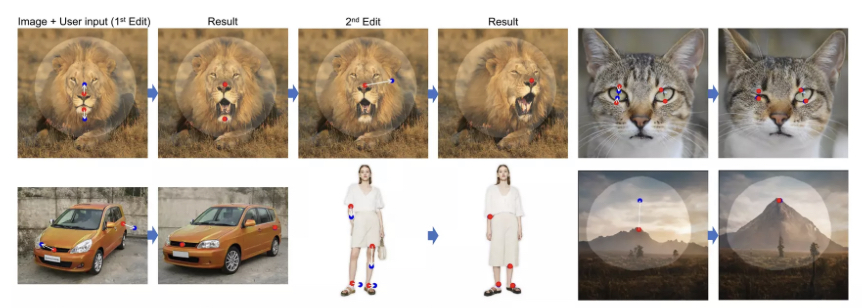
    DragGAN technique empowers users to effortlessly manipulate the content of GAN-generated images. With just a few clicks on the image, utilising handle points (highlighted in red) and target points (highlighted in blue), our approach precisely moves the handle points to align with their corresponding target points. For added flexibility, users can draw a mask to define the adaptable region (indicated by a brighter area), while keeping the remainder of the image unchanged. This point-based manipulation provides users with unparalleled control over various spatial attributes, including pose, shape, expression, and layout, spanning a wide range of object categories.

  • Web 3.0 – On  The Timeline Of Internet

    Web 3.0 – On The Timeline Of Internet

    Birth of Internet

    It’s a common misconception that the Internet and the web are synonymous, but they are distinct entities. The Internet serves as the foundation, while the web represents one method of utilizing it. Numerous methods, including Email, VOIP, and Video Conferencing, operate on the Internet alongside the web.

    The Internet signifies the interconnection of computers. In 1962, computer scientist J.C.R. Licklider from MIT was the first to propose the concept of networked computers.

    In 1969, ARPANET marked the first usage of the internet. During the 1970s, various interconnected networks operated using different protocols. Then, on 01 January 1983, the TCP/IP protocol was introduced, which is also considered as the birth of the Internet.

    Web 1.0 (Read Only)

    In 1989, a pivotal moment in the history of the internet occurred when Tim Berners-Lee, a British computer scientist, invented the World Wide Web (WWW) while working at CERN, the European Organization for Nuclear Research. Berners-Lee’s invention was a breakthrough that revolutionized the way we access, share, and interact with information on the internet..

    In its early stages, the web operated as a read-only platform, akin to newspapers, where users could only view webpages without the ability to comment or interact. This era, often referred to as Web 1.0, was characterized by static web pages published by large institutions, offering limited user engagement.

    In 1993, the web became accessible to the public, marking the emergence of web browsers such as Netscape Navigator and Opera 1.0, along with the birth of search engines like Aliweb, Yahoo, and Google.

    During the late 1990s, as the number of commercial websites grew, the process of commercializing the web gained momentum, leading to the dot-com bubble boom.

    Subsequently, in March 2000, the dot-com bubble burst, leading to the failure and shutdown of numerous online shopping and communication companies.

    Web 2.0 (Web Apps)

    Web 2.0 is the second iteration of web and it comes into effect around the year 2005.

    It was the time when web changed from read only to read-write format . Now the web application begins to get popular. Now the web was more dynamic as compared to web1.0.

    With this upgradation in the internet community. Now individuals have the power to comment, share and publish their ideas on various social media platforms like facebook, twitter etc. This is the time when tech giants like Google, Facebook and Amazon govern the whole internet community. They are the centralised authoritarian to control who receives what information depending upon their personal data collected from individuals. They can stop their services for any individual or nation in case of conflict.

    In Web2.0 user does not have control over their personal data. They are tricked by tech platforms to give their personal information, to access free web services. Here the price is individuals personal data. This collected data is then processed, using advanced algorithms and personal profiling is done. On the basis of which advertisers and different agendas are targeted to the user.

    Web 2.0 reigns from approx 2005 till now.

    Web3.0 – A new era of Information technology

    Web3.0 is the most hyped term in the year 2020-2021. Most of the internet users are trying to figure out “what exactly web3.0 is ?”.

    Unlike web 2.0  which is centralised and controlled by big tech platforms. The idea of web3.0 is completely based on decentralisation.

    For better understanding of “centralised and decentralised” in the field of internet. Let us assume the internet as a country and its users as its citizens. Now centralised internet is like autocracy, where one person controls the whole community. 

    Whereas a decentralised internet is like Democracy (By the people, for the people, of the people). Where total power lies in the hands of the common users. Decisions are taken by the process of voting.

    On the timeline of the internet evolution web3.0 is the ongoing iteration of the web as we know it today.

    There is no fix point on the timeline where one can say that this is the beginning of web3.0. However some believe that adoption of blockchain is the mark point behind web 3.0.

    In web 3.0 user data is hosted and managed on blockchain which runs on algorithm without any human interference. User have total control over their personal data, stored on digital wallets.

    Here everyone have the equal authority, all decisions on the blockchain are made through concensus.

    Cryptocurrency, NFT (Non-fungible Token), Defi (Decentralised Finance), DAO (Decentralised Autonomous Organisation )and Metaverse are some of the examples of Web3.0. These all are decentralise in operations and based on Blockchain technology.

    Web3.0 is still in its early phase. So it is difficult to predict what it will look like in the near future.

  • Metaverse Explained

    Metaverse Explained

    Metaverse

    Metaverse is the most hyped word on the internet nowadays.

    It was first coined in 1992 by a sci-fi nobel writer Neal Stephenson to describe a 3D world.

    Once it was science fiction but nowadays it is getting closer to reality due to advancement in various tech sectors like Blockchain technology, Augmented reality and Virtual reality.

    What is Metaverse?

    Metaverse is a virtual universe simulated by different computing hardwares, where human beings and artificial intelligence characters coexist. 

    In the metaverse we can play different games, hang out with friends, make official meetings and visit art galleries. We don’t really enter the metaverse; rather our 3D avatar’s controlled by us enter this immersive world and then we interact with others via avatars. 

    Metaverse Presence 

    Question here is whether the metaverse is already present or it’s merely a hypothesis?

    Answer is ‘yes’ it is already present but in its initial stage, it has a long journey to go. VR games like Roblox, Sandbox, decentraland are some of the rough examples of metaverse.

    True concept of metaverse is of decentralisation means not in the control of a single tech firm or government organization but should be controlled, designed and created by its users.

    At present many big tech’s are developing their own form of metaverse. Recently social media platform facebook has launched ‘Horizon’ , Microsoft, Google and many other big tech companies are also progressive in this field.

    Metaverse Future 

    Two decade ago there were  no social media platforms but with the advent of time and technology their number has increased from no to many.

    Nowadays most of us spend a major part of time on these social media platforms. So the metaverse is in that ‘two decade ago’ state soon it is going to take the internet by storm.

    At present you can take metaverse early exposure on various gaming platforms like sandbox, roblox etc.

    Real Estate Growth  on Metaverse

    On Metaverse real estate is  a booming industry. There are many metaverse platforms dealing in real estate. Sandbox, Decentraland, Cryptovoxels and Somnium are some of them. On the Metaverse unit of land is Parcel, you can buy or sell parcels of land on their respective websites or from different marketplaces like ‘opensea’ using cryptocurrency.