Author: aks0911

  • Say Hello to DragGAN – Generative Image Editing AI

    Say Hello to DragGAN – Generative Image Editing AI

    Introduction

    Introducing DragGAN, the latest sensation to captivate the internet following the triumph of chatbots like ChatGPT, Bard, and DALL.E (a revolutionary AI image generation tool). Developed by a collaborative team of researchers from Google, Max Planck Institute for Informatics, and MIT, DragGAN has arrived to revolutionise generative image editing.

    DragGAN: Unleash Your Creative Power with Revolutionary AI Image Editing

    With DragGAN, anyone can effortlessly edit images like a seasoned professional, without the need for complex and cumbersome Photo editing software. This innovative tool, driven by the power of generative AI, allows users to unleash their creativity through a simple point-and-drag interface.

    DragGAN

    At its core, DragGAN (Interactive Point-based Manipulation on the Generative Image Manifold) harnesses the remarkable capabilities of a pre-trained GAN. By faithfully adhering to user input while maintaining the boundaries of realism, this method sets itself apart from previous approaches. Gone are the days of relying on domain-specific modeling or auxiliary networks. Instead, DragGAN introduces two groundbreaking components: a latent code optimization technique that progressively moves multiple handle points towards their intended destinations, and a precise point tracking procedure that faithfully traces the trajectory of these handle points. Leveraging the discriminative qualities found within the intermediate feature maps of the GAN, DragGAN achieves pixel-perfect image deformations with unprecedented interactive performance.

    Be ready to embark on a new era of image editing as DragGAN paves the way for intuitive and powerful point-based manipulation on the generative image manifold.

    Its white paper has been released and code will be made public in jun 2023.

    DragGAN Demo

    DragGAN | Author={Pan, Xingang and Tewari, Ayush, and Leimk{\”u}hler, Thomas and Liu, Lingjie and Meka, Abhimitra and Theobalt, Christian},

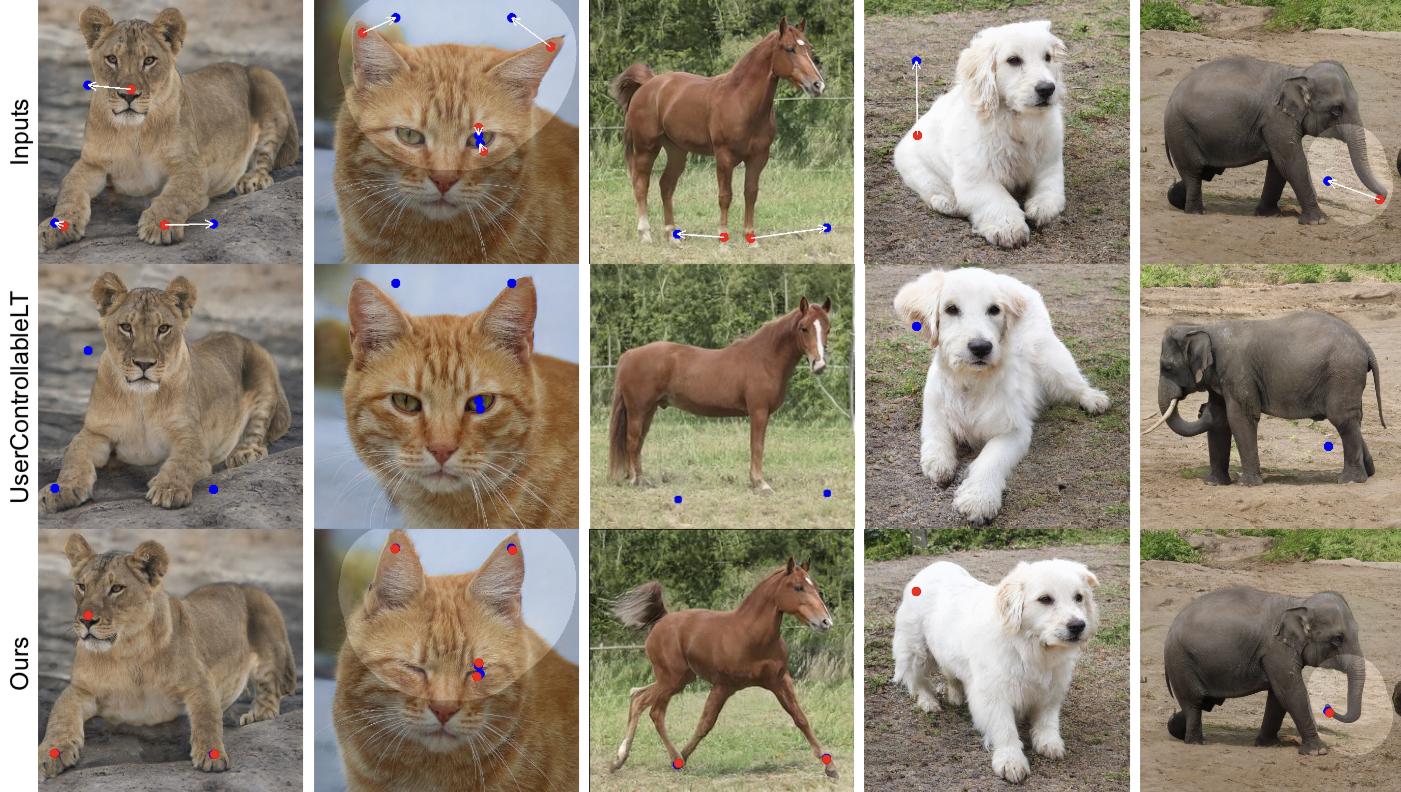
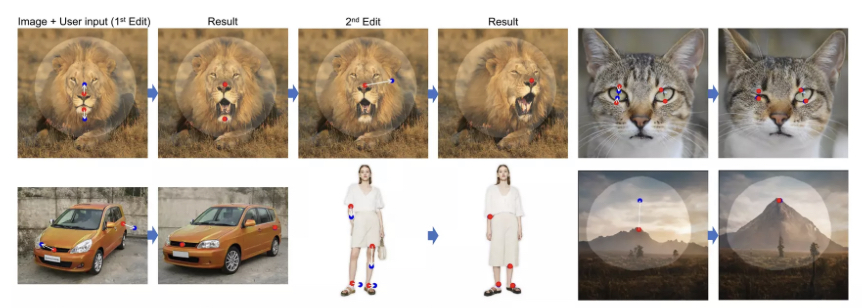
    DragGAN technique empowers users to effortlessly manipulate the content of GAN-generated images. With just a few clicks on the image, utilising handle points (highlighted in red) and target points (highlighted in blue), our approach precisely moves the handle points to align with their corresponding target points. For added flexibility, users can draw a mask to define the adaptable region (indicated by a brighter area), while keeping the remainder of the image unchanged. This point-based manipulation provides users with unparalleled control over various spatial attributes, including pose, shape, expression, and layout, spanning a wide range of object categories.

  • Web 3.0 – On  The Timeline Of Internet

    Web 3.0 – On The Timeline Of Internet

    Birth of Internet

    It’s a common misconception that the Internet and the web are synonymous, but they are distinct entities. The Internet serves as the foundation, while the web represents one method of utilizing it. Numerous methods, including Email, VOIP, and Video Conferencing, operate on the Internet alongside the web.

    The Internet signifies the interconnection of computers. In 1962, computer scientist J.C.R. Licklider from MIT was the first to propose the concept of networked computers.

    In 1969, ARPANET marked the first usage of the internet. During the 1970s, various interconnected networks operated using different protocols. Then, on 01 January 1983, the TCP/IP protocol was introduced, which is also considered as the birth of the Internet.

    Web 1.0 (Read Only)

    In 1989, a pivotal moment in the history of the internet occurred when Tim Berners-Lee, a British computer scientist, invented the World Wide Web (WWW) while working at CERN, the European Organization for Nuclear Research. Berners-Lee’s invention was a breakthrough that revolutionized the way we access, share, and interact with information on the internet..

    In its early stages, the web operated as a read-only platform, akin to newspapers, where users could only view webpages without the ability to comment or interact. This era, often referred to as Web 1.0, was characterized by static web pages published by large institutions, offering limited user engagement.

    In 1993, the web became accessible to the public, marking the emergence of web browsers such as Netscape Navigator and Opera 1.0, along with the birth of search engines like Aliweb, Yahoo, and Google.

    During the late 1990s, as the number of commercial websites grew, the process of commercializing the web gained momentum, leading to the dot-com bubble boom.

    Subsequently, in March 2000, the dot-com bubble burst, leading to the failure and shutdown of numerous online shopping and communication companies.

    Web 2.0 (Web Apps)

    Web 2.0 is the second iteration of web and it comes into effect around the year 2005.

    It was the time when web changed from read only to read-write format . Now the web application begins to get popular. Now the web was more dynamic as compared to web1.0.

    With this upgradation in the internet community. Now individuals have the power to comment, share and publish their ideas on various social media platforms like facebook, twitter etc. This is the time when tech giants like Google, Facebook and Amazon govern the whole internet community. They are the centralised authoritarian to control who receives what information depending upon their personal data collected from individuals. They can stop their services for any individual or nation in case of conflict.

    In Web2.0 user does not have control over their personal data. They are tricked by tech platforms to give their personal information, to access free web services. Here the price is individuals personal data. This collected data is then processed, using advanced algorithms and personal profiling is done. On the basis of which advertisers and different agendas are targeted to the user.

    Web 2.0 reigns from approx 2005 till now.

    Web3.0 – A new era of Information technology

    Web3.0 is the most hyped term in the year 2020-2021. Most of the internet users are trying to figure out “what exactly web3.0 is ?”.

    Unlike web 2.0  which is centralised and controlled by big tech platforms. The idea of web3.0 is completely based on decentralisation.

    For better understanding of “centralised and decentralised” in the field of internet. Let us assume the internet as a country and its users as its citizens. Now centralised internet is like autocracy, where one person controls the whole community. 

    Whereas a decentralised internet is like Democracy (By the people, for the people, of the people). Where total power lies in the hands of the common users. Decisions are taken by the process of voting.

    On the timeline of the internet evolution web3.0 is the ongoing iteration of the web as we know it today.

    There is no fix point on the timeline where one can say that this is the beginning of web3.0. However some believe that adoption of blockchain is the mark point behind web 3.0.

    In web 3.0 user data is hosted and managed on blockchain which runs on algorithm without any human interference. User have total control over their personal data, stored on digital wallets.

    Here everyone have the equal authority, all decisions on the blockchain are made through concensus.

    Cryptocurrency, NFT (Non-fungible Token), Defi (Decentralised Finance), DAO (Decentralised Autonomous Organisation )and Metaverse are some of the examples of Web3.0. These all are decentralise in operations and based on Blockchain technology.

    Web3.0 is still in its early phase. So it is difficult to predict what it will look like in the near future.

  • Metaverse Explained

    Metaverse Explained

    Metaverse

    Metaverse is the most hyped word on the internet nowadays.

    It was first coined in 1992 by a sci-fi nobel writer Neal Stephenson to describe a 3D world.

    Once it was science fiction but nowadays it is getting closer to reality due to advancement in various tech sectors like Blockchain technology, Augmented reality and Virtual reality.

    What is Metaverse?

    Metaverse is a virtual universe simulated by different computing hardwares, where human beings and artificial intelligence characters coexist. 

    In the metaverse we can play different games, hang out with friends, make official meetings and visit art galleries. We don’t really enter the metaverse; rather our 3D avatar’s controlled by us enter this immersive world and then we interact with others via avatars. 

    Metaverse Presence 

    Question here is whether the metaverse is already present or it’s merely a hypothesis?

    Answer is ‘yes’ it is already present but in its initial stage, it has a long journey to go. VR games like Roblox, Sandbox, decentraland are some of the rough examples of metaverse.

    True concept of metaverse is of decentralisation means not in the control of a single tech firm or government organization but should be controlled, designed and created by its users.

    At present many big tech’s are developing their own form of metaverse. Recently social media platform facebook has launched ‘Horizon’ , Microsoft, Google and many other big tech companies are also progressive in this field.

    Metaverse Future 

    Two decade ago there were  no social media platforms but with the advent of time and technology their number has increased from no to many.

    Nowadays most of us spend a major part of time on these social media platforms. So the metaverse is in that ‘two decade ago’ state soon it is going to take the internet by storm.

    At present you can take metaverse early exposure on various gaming platforms like sandbox, roblox etc.

    Real Estate Growth  on Metaverse

    On Metaverse real estate is  a booming industry. There are many metaverse platforms dealing in real estate. Sandbox, Decentraland, Cryptovoxels and Somnium are some of them. On the Metaverse unit of land is Parcel, you can buy or sell parcels of land on their respective websites or from different marketplaces like ‘opensea’ using cryptocurrency.

  • Create NFT For Free

    NFT Definition

    Any Digital art Like image, animation, video etc minted on a blockchain and listed on a market place is termed as NFT.

    Create And Sell NFT

    To create and sell digital art as NFT you first need to have a crypto wallet like Metamask, Rainbow, Argent, imToken etc. This crypto wallet will be required at the time of login.

    Here we will see how to set up a metamask wallet, it is an Etherium based cryptocurrency wallet. You can store and exchange ‘Ether’ and etherium based NFT in this wallet.

    Metamask can be used as a web extension or mobile wallet application, best and easiest way is to download Metamask app from the app store.

    Once installed and configured you will get above type of page here you can edit your wallet name as per your choice.

    Marketplace selection 

    Now after we have successfully set up our crypto wallet we will proceed to select the best marketplace for our NFT.

    Here are some of the places where NFT’s can be bought or sold.

    https://opensea.io/

    https://zora.io/

    https://rarible.com/

    Marketplace selection depends on various factors like 

    Blockchain Gas Fees (Minting  Fees) :  Gas fees is the main deciding factor, before selection of the platform check out the gas fees.

    Blockchain gas fees are  high for etherium blockchain due to its popularity among NFT lovers whereas some newer blockchains have less or nill fees

    For example you can mint your NFT for free on Blockchain polygon on 

    https://opensea.io/

    Listing fees or brokerage commission: listing fees of different marketplace  also vary as per their popularity

    Popularity of Marketplace: popularity of marketplace is also one of the important factors of your NFT getting sold. So before selecting the place do a web survey for its popularity.

    Create and Sell

    Here, we will select opensea as the marketplace and polygon as the blockchain.

    First of all visit the website

    https://opensea.io/

    On ‘opensea’ click on create button then on next window click on “walletconnect” if you are using same device on which wallet is installed Otherwise select as per your requiremets. 

    If You click on walletconnect your wallet will launch and once you give the sign in permission you will be logged into the opensea platform.

    Caution: NFT is a growing technology so the risk of scams and hacking are also high so be extra cautious while giving any permissions or visiting URLs.

    After you’ve successfully logged in again click on create button this time you will be redirected to page where you have to browse and upload your digital art, give it a name, select the blockchain on which you want to host your NFT. Keep in mind etherium blockchain charges fees whereas polygon network is free at this time.

    So you can start on polygon and thereafter move to etherium  blockchain when you feel it necessary.

    So move on and create your First NFT share your experience in the comment box, if you face any difficulties in above steps please do write below in the comments.

  • NFT Basics In Simple terms


    NFT

    The word NFT is among the most searched google words in the year 2021.

    NFT stands for Non-Fungible Tokens in simple words Non Fungible Token means Non Replaceable Tokens means no one can ever replace the record of creator and owner from a blockchain once created of your digital arts linked to a blockchain. Mainly NFT’s are minted on Ethereum blockchain but alternative blockchains are also available .

    Non-Fungible Tokens and cryptocurrencies like Bitcoin and Ether are the initial application of “Blockchain”  technology. Crypto experts around the world are trying to harvest the hidden treasures of Blockchain technology.

    Most hyped words like web3, metaverse, NFT are the start of a new kind of internet as we know today.

    How Does NFT Works

     NFT is one of many upcoming applications of Blockchain technology.

    Anything in digital format like still jpg , vector drawings, songs, any audio, video, an article or an e book once minted on a blockchain and listed on a NFT marketplace can be termed as NFT.

    NBA top shots, Bored Ape Yacht Club, and Important events video clips are some of the examples of NFT.

    If you own any digital asset you can sell that on NFT marketplaces like opensea, rarible, Zora, curate etc.

    Create/Buy/Sell Your First NFT

    To create, sell or buy NFT, visit any available NFT marketplaces, connect your crypto wallet with some etherium balance in it to pay for the minting fee.

    Upload your digital art, select from the available blockchains and create your first NFT. Once Someone buys your digital art you amount is directly credited to your wallet linked to the marketplace.

    After connecting your crypto wallet you can also buy NFT’s already listed on the marketplace, there are millions of NFT’s waiting to be sold. 

  • BIOS setup and OS installation

    BIOS Settings and OS installation

    BIOS Setup

    After successful installation of the machine power on the system.

    You will be launched into the BIOS of the System. Different motherboards have slightly different BIOS setups.

    In the BIOS you can set up your fans speed, change boot order, overclock your system and know your hardware information.

    Selection of Operating System

    You can select your system OS from many available Operating Systems (Windows, Unix, Linux etc).

    Windows is the most popular OS.

    Here I will show you how to install Windows on your Internal Disk.

    First of all change boot order from BIOS settings, set USB hard disk on first priority.

    OS Installation 

    Next, prepare a Windows bootable USB.

    Requirements:

    Here I will explain one of the Bootable USB creating tool 

    “Rufus” .

    In the rufus selection box, select the USB drive for OS installation in the “device ” selection box.

    In the “Boot selection” option select the windows iso image file.

    In the “partition system” select GPT or MBR depending upon your BIOS

    Morden BIOS supports the GPT partition system and older ones support the MBR partition system. 

    After all the necessary setups  click on the ready button, wait for some time to complete the process and then safely remove the USB drive.

    Insert USB drive in any of the available USB ports, and follow the installation instructions.

    • Select language and keyboard format.
    • Accept license terms.
    • Select type of installation: upgrade or custom

    Select “custom” for fresh installation.

    Select “upgrade” for upgrade to a new version and keep data from your previous installation.

    • Select installation partition.

    If  you are installing windows for the first time you may have to create partitions.

    Or if you are upgrading from the lower version you will see a list of predefined partitions. If any of the partitions hold any important data do not format or delete them otherwise you will lose the stored data.

    • Installing windows.

    After selection of the windows partition final installation begins. Wait for some time to complete installation.

    When windows restart remove the USB drive or you will again boot into the windows installation process.

    Now the window will set up necessary features and settings to keep it running, wait and follow onscreen instructions.

    Step1: Choose your PC Hardwares.

    Step 2: Hardware installation.