Category: Uncategorized

  • Agentic AI Explained: How Autonomous AI Agents Are Redefining Work and Productivity

    Agentic AI Explained: How Autonomous AI Agents Are Redefining Work and Productivity

    Introduction: AI Is Learning to Act, Not Just Respond

    Artificial intelligence has come a long way in a short time. Not long ago, AI systems were mainly used to answer questions, generate content, or automate simple tasks. They were powerful, but they always depended on human input.

    Now, a new evolution is changing that dynamic.

    We are entering the age of Agentic AI, where AI systems don’t just respond—they act, plan, and execute tasks independently. Instead of waiting for instructions at every step, they can take a goal and work toward completing it.

    This shift is subtle on the surface, but its impact is massive. It changes how software works, how businesses operate, and how individuals can create value.


    What is Agentic AI?

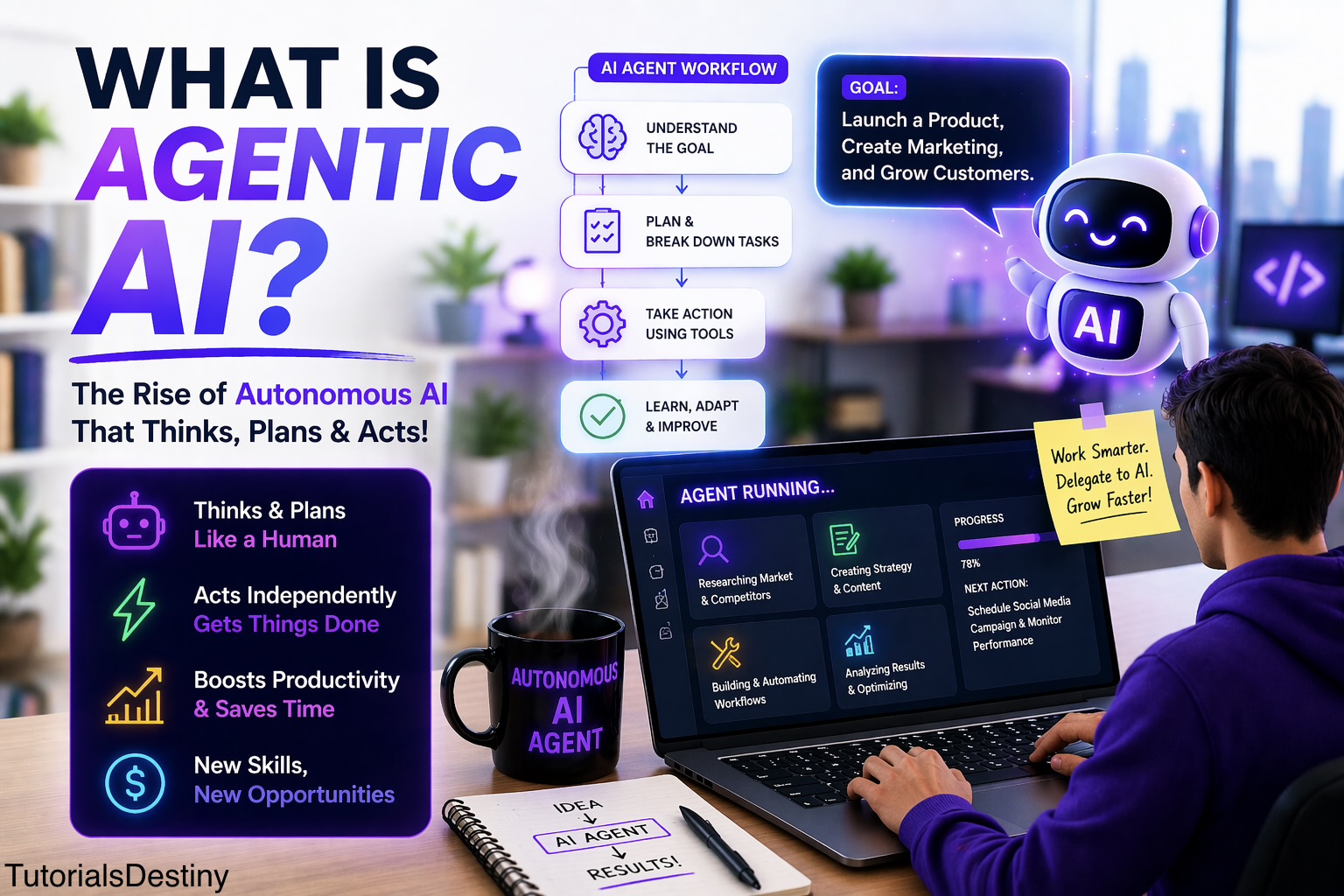
    Agentic AI refers to artificial intelligence systems designed to function as autonomous agents. These systems are capable of understanding a goal, breaking it into steps, and taking action without needing constant human guidance.

    In simple terms:

    Agentic AI is AI that can think, plan, and act on its own to achieve a goal.

    Instead of asking AI:

    “Write a marketing email”

    You might say:

    “Help me launch a product and attract customers.”

    An agentic system will not stop at one output. It will:

    • Analyze your product
    • Identify your target audience
    • Create marketing strategies
    • Generate content
    • Suggest improvements

    This ability to go beyond a single task is what makes it powerful.


    How Agentic AI Works

    To understand why Agentic AI feels so advanced, it helps to look at how it operates behind the scenes.

    When you assign a goal, the system goes through a continuous cycle:

    1. Understanding the Goal

    It interprets what you actually want. Human instructions are often vague, so the AI must define the objective clearly.

    2. Planning the Steps

    The system breaks the goal into smaller tasks. This is similar to how a human would plan a project.

    3. Taking Action

    It executes tasks using tools, data, or generated outputs.

    4. Evaluating Results

    It checks whether the actions are working.

    5. Adapting

    If something fails, it adjusts its approach and tries again.

    This loop allows the system to behave in a way that feels intelligent and purposeful rather than reactive.


    Agentic AI vs Traditional AI

    The difference between traditional AI and Agentic AI is best understood through behavior.

    Traditional AI acts like a responsive assistant. It waits for commands and delivers outputs.

    Agentic AI acts like a self-directed worker. It takes initiative and continues working toward a goal.

    Key Differences:

    • Traditional AI focuses on single tasks
    • Agentic AI focuses on complete outcomes
    • Traditional AI needs continuous input
    • Agentic AI works with minimal supervision
    • Traditional AI responds
    • Agentic AI acts and adapts

    This shift from reaction to action is what makes Agentic AI a major breakthrough.


    Real-World Example: From Idea to Execution

    Let’s make this practical.

    Imagine you want to start an online business.

    With traditional AI, you would:

    • Ask for business ideas
    • Generate content separately
    • Create a website manually
    • Plan marketing step by step

    With Agentic AI, you could simply define a goal:

    “Create and launch a small online business.”

    The system could then:

    • Research profitable niches
    • Suggest a business model
    • Generate a website structure
    • Create product descriptions
    • Draft marketing campaigns

    Instead of assisting in parts, it contributes to the entire process.


    Why Agentic AI is Gaining Attention

    Agentic AI is not just another tech trend. It is gaining traction because it solves real problems.

    First, it dramatically improves speed. Tasks that used to take days can now be initiated and completed much faster.

    Second, it reduces effort. Instead of managing every detail, users can focus on defining goals.

    Third, it increases accessibility. Even people without deep technical skills can build and execute complex workflows.

    In short, it allows people to:

    • Do more in less time
    • Build without large teams
    • Turn ideas into results faster

    Benefits of Agentic AI

    The advantages of Agentic AI become clearer when you see how it impacts real work.

    Increased Productivity

    AI agents can handle repetitive and time-consuming tasks, freeing up time for higher-level thinking.

    Better Decision Support

    They can analyze data and suggest actions, helping users make informed decisions.

    Scalability

    One system can manage multiple tasks simultaneously, something difficult for individuals.

    Consistency

    Unlike humans, AI systems do not get tired, which ensures steady performance.

    Innovation

    When execution becomes easier, people experiment more and explore new ideas.


    Limitations and Challenges

    Despite its strengths, Agentic AI is not without flaws.

    One major challenge is accuracy. AI systems can sometimes generate incorrect results or follow flawed logic. Without proper oversight, this can lead to poor outcomes.

    Another concern is control. Since these systems act autonomously, it becomes important to define boundaries and monitor actions.

    Security is also a key issue. Giving AI access to tools and data requires careful handling to avoid misuse.

    Finally, there is the risk of over-dependence. If users rely completely on AI without understanding the process, they may struggle when problems arise.


    Skills You Need in the Age of Agentic AI

    As AI becomes more autonomous, the skills required are evolving.

    You don’t need to be an expert programmer, but you do need to think clearly and strategically.

    Important Skills:

    • Clear goal setting
    • Prompt writing
    • Critical thinking
    • Basic technical understanding
    • Ability to evaluate results

    In this new environment, your role shifts from “doing everything” to guiding intelligent systems.


    Agentic AI and Vibe Coding: How They Connect

    If you’ve explored vibe coding, you already have a head start.

    Vibe coding focuses on creating code using AI prompts. It helps you build applications faster without deep coding knowledge.

    Agentic AI goes a step further.

    Instead of just generating code, it can use that code to complete entire tasks or workflows.

    Think of it this way:

    • Vibe Coding = Building tools with AI
    • Agentic AI = Using AI to run and manage those tools

    Together, they form a powerful combination for creators and developers.


    How to Get Started with Agentic AI

    Getting started is easier than it might seem.

    Begin by exploring AI tools that support automation and task execution. Start with simple goals, such as automating small workflows or generating structured outputs.

    As you gain confidence, move toward more complex tasks like building systems that handle multiple steps.

    The key is to experiment consistently. The more you use these systems, the better you understand how to guide them effectively.


    How to Make Money Using Agentic AI

    Agentic AI is not just about technology—it’s also about opportunity.

    Because it improves efficiency, it opens new ways to earn.

    You can use it to automate services for businesses, build digital products, or manage multiple projects simultaneously.

    Popular Ways to Earn:

    • Offering automation services to small businesses
    • Building AI-powered tools or SaaS products
    • Freelancing with faster delivery
    • Creating and selling digital content
    • Managing online businesses with minimal effort

    For example, you could use Agentic AI to create and manage websites for clients, reducing the time required and increasing your earning potential.


    The Future of Agentic AI

    Looking ahead, Agentic AI is expected to become more advanced and more integrated into everyday workflows.

    We may see systems where multiple AI agents collaborate, each handling different parts of a task. These systems could operate almost like digital teams.

    At the same time, the interaction between humans and AI will become more natural. Instead of giving detailed instructions, users will focus on defining outcomes.

    However, this growth will also bring challenges. Ethical concerns, regulations, and system reliability will become increasingly important.


    Will Agentic AI Replace Humans?

    This is a common concern, but the reality is more balanced.

    Agentic AI will replace certain repetitive tasks, but it will also create new roles and opportunities.

    Humans will continue to play a critical role in:

    • Strategic thinking
    • Creativity
    • Leadership
    • Ethical decision-making

    Rather than replacing humans, Agentic AI is more likely to enhance human capabilities.


    Final Thoughts

    Agentic AI represents a major shift in how technology is used.

    It moves us from a world where AI assists with tasks to one where AI can take initiative and drive outcomes.

    For individuals, this means more power to build and create. For businesses, it means greater efficiency and scalability.

    But success with Agentic AI depends on how well you use it. The better you define goals, guide systems, and evaluate results, the more value you can extract.


    Conclusion

    Agentic AI is not just another buzzword—it is a glimpse into the future of work.

    By combining autonomy, intelligence, and adaptability, it is transforming how tasks are performed and how ideas are executed.

    If you are willing to learn and experiment, this technology offers a powerful advantage.

    Because the future is not just about using AI tools.

    It’s about working with systems that can think, act, and evolve alongside you.

  • How to Use Python Documentation Effectively

    How to Use Python Documentation Effectively

    Introduction

    Understanding and navigating Python documentation is a vital skill for every developer. Whether you’re debugging code, exploring new modules, or learning how a specific function works—knowing how to use the official Python documentation will save you time and elevate your coding.


    What is Python Documentation?

    Python documentation is the official reference published by the Python Software Foundation. It contains detailed information about:

    • Syntax rules and data types
    • Built-in functions and exceptions
    • Standard library modules
    • Best practices and tutorials

    Official documentation site: https://docs.python.org/3/


    How to Navigate the Python Docs

    Mastering how to explore the documentation can dramatically improve your self-sufficiency.

    1. Start With the Search Bar
      Type keywords like <mark style="background-color:#e1e1e1" class="has-inline-color">list</mark>, for <mark style="background-color:#e1e1e1" class="has-inline-color">loop</mark>, or <mark style="background-color:#e1e1e1" class="has-inline-color">zip()</mark> to jump to relevant topics quickly.
    2. Understand the Structure
      • Tutorial: Beginner-friendly introduction to Python
      • Library Reference: Complete details on standard modules and functions
      • Language Reference: Covers core syntax and semantics
      • FAQs and Glossary: Quick clarifications and key terms
    3. Use the Sidebar or Module Index
      Find topics alphabetically or browse by category (e.g., File I/O, Networking, Math).
    4. Follow Cross-References
      Many pages link to related modules or advanced usage examples.

    Key Elements to Pay Attention To

    When reading documentation, focus on the following:

    Function Signatures

    Shows the required arguments, optional parameters (with default values), and return types.
    📌 Example: random.randint(a, b) → int

    Parameters and Return Values

    Every function includes a detailed breakdown of what inputs it accepts and what it returns.

    ⚠️ Notes and Warnings

    These provide cautionary information, edge cases, or behavior that differs between versions.

    Version Compatibility

    Not all functions are available in every version of Python. Watch for “New in version…” notes.

    Code Examples

    Most entries include real examples that show how to use the function—perfect for quick testing.


    Tips for Using Python Docs Effectively

    • Start with the Tutorial if you’re new.
    • Bookmark useful pages like:
    • Test what you read immediately in your IDE or REPL (e.g., Python shell, Jupyter).
    • If you don’t understand a parameter, check its data type and see how it behaves in practice.
    • Use examples as templates. Modify and run them to understand how they work.
    • Combine docs with hands-on experimentation for deep learning.
    • Still confused? Look for the same topic on Real Python, Stack Overflow, or YouTube—but always start with the docs!

    Practice Activity

    Try this hands-on challenge to get comfortable with the documentation:

    1. Go to the documentation for the random module.
    2. Explore functions like random.choice(), random.randint(), and random.shuffle().
    3. In your IDE, test each function with different arguments.
    4. Reflect on:
      • What inputs did it accept?
      • What output did it return?
      • Was there anything unexpected or new?

    Essential Documentation Links

    CategoryLink
    Python 3 Main Docsdocs.python.org/3
    Built-in Functionsfunctions.html
    Python Tutorialtutorial/index.html
    Standard Library (Modules)py-modindex.html

    Final Thoughts

    Reading documentation may feel overwhelming at first, but it becomes easier and incredibly rewarding with practice. Start with modules you frequently use, and make it a habit to read about unfamiliar functions before searching elsewhere.

    The better you get at reading docs, the faster and more independently you’ll be able to code.


  • Writing Clean and Readable Code (PEP8 Guidelines)

    Writing Clean and Readable Code (PEP8 Guidelines)

    Introduction

    A guide to writing beautiful, readable, and professional Python code

    Writing clean and readable code is essential for collaboration, maintenance, and debugging. Python promotes readability through its official style guide, PEP8 (Python Enhancement Proposal 8). This module will walk you through the core PEP8 guidelines and best practices to help you write code that looks good and makes sense to others (and your future self).


    Why Code Style Matters

    • Readability: Clear formatting and naming make code easier to understand.
    • Consistency: Consistent style reduces cognitive load when switching between projects.
    • Collaboration: Well-formatted code is easier to review, debug, and maintain in teams.
    • Professionalism: Clean code reflects good discipline and professionalism.

    Formatting and Layout Rules

    Indentation

    Use 4 spaces per indentation level. Avoid using tabs.

    def greet(name):
        print("Hello,", name)

    Maximum Line Length

    Keep lines under 79 characters. For docstrings or comments, aim for 72 characters.

    # This is a comment that follows the recommended line length guidelines.

    Line Breaks

    Use blank lines to separate:

    • Functions and class definitions
    • Logical sections of code inside a function

    Naming Conventions

    ElementConventionExample
    Variablelower_case_with_underscoresuser_name
    Functionlower_case_with_underscorescalculate_total()
    ClassCapitalizedWordsUserProfile
    ConstantALL_CAPS_WITH_UNDERSCORESMAX_RETRIES

    🚫 Avoid single-letter variable names unless used in short loops.


    Writing Comments and Docstrings

    Inline Comments

    Should be brief and start with a #, with one space after it.

    x = x + 1  # Increment x by 1

    Block Comments

    Use for longer explanations before code blocks. They should be indented at the same level as the code.

    Docstrings

    Use triple quotes to describe functions, classes, or modules.

    def multiply(a, b):
        """Returns the product of two numbers."""
        return a * b

    Spacing Rules

    • No extra spaces around = when used for keyword arguments or default values.
    • One space around binary operators (+, -, =, etc.)
    • No space between a function name and its opening parenthesis.
    # Correct:
    total = a + b
    def greet(name):
    
    # Incorrect:
    total=a+b
    def greet (name):

    Tools for Code Style and Formatting

    1. Black – The uncompromising code formatter.
    2. flake8 – Checks your code against PEP8 and detects style violations.
    3. pylint – Linter that also checks for code smells and possible bugs.
    4. isort – Automatically sorts your Python imports.

    💡 Most IDEs like VS Code and PyCharm support these tools with extensions or built-in integrations.


    💡 Pro Tips

    • Use consistent indentation throughout the project.
    • Use descriptive names instead of short unclear ones.
    • Keep functions small and focused on a single task.
    • Don’t over-comment obvious code; comment why, not what, when possible.
    • Break long logic into smaller helper functions.
    • Run your code through a formatter like black before finalizing.

    📌 Challenge Exercise:
    Take one of your older Python scripts and refactor it using PEP8 guidelines. Use flake8 or black to identify and fix violations.


  • What is Edge Computing? Why It’s the Future of Tech?

    What is Edge Computing? Why It’s the Future of Tech?

    Introduction

    As technology continues to evolve, the demand for real-time processing, low-latency applications, and localized data handling is skyrocketing. This is where Edge Computing comes into play. It’s not just a buzzword—edge computing is redefining how we process and manage data, and it’s becoming a cornerstone of modern tech infrastructure.


    What is Edge Computing?

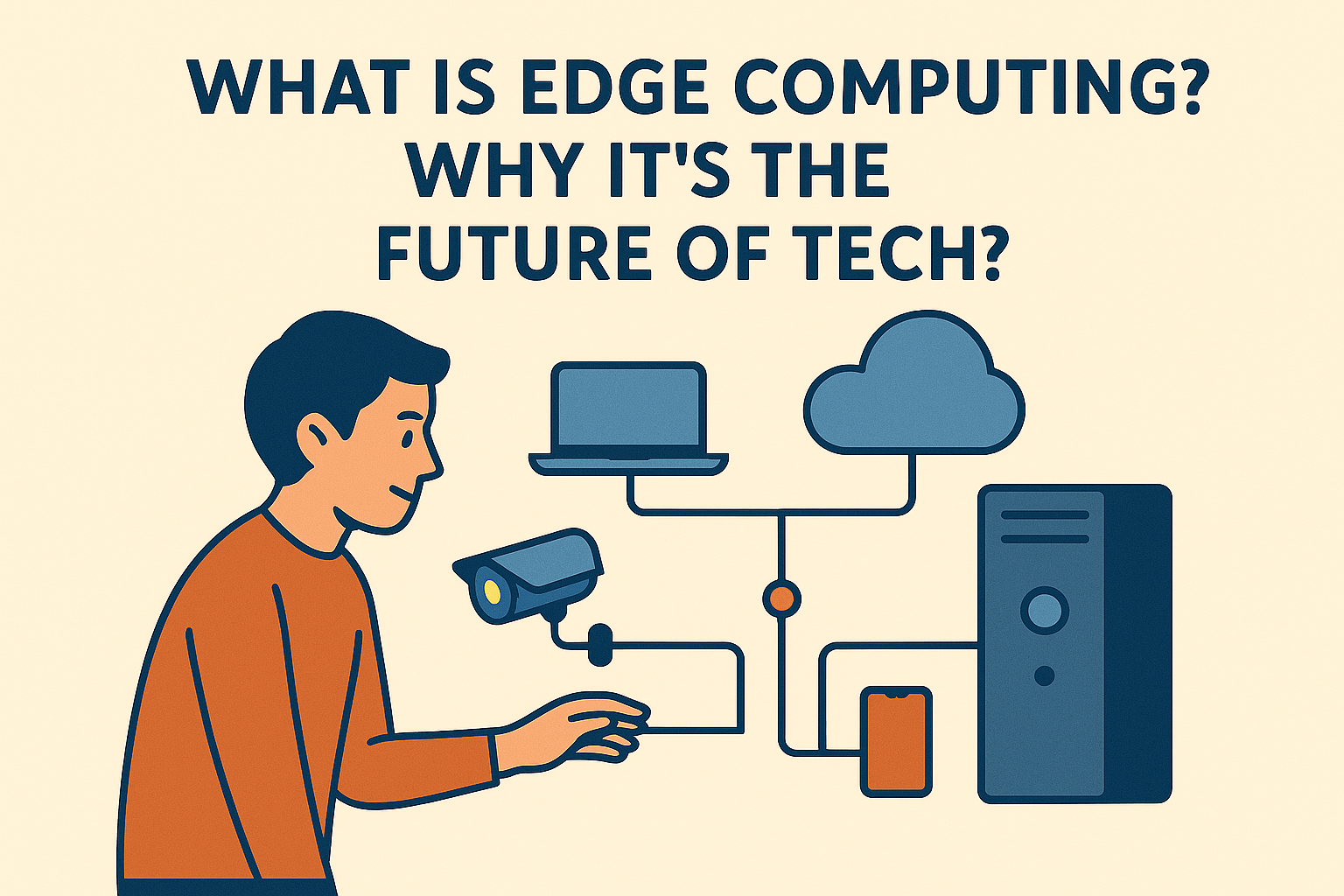
    Edge computing refers to the practice of processing data closer to the source where it is generated, rather than relying solely on centralized cloud data centers. This means computation happens on devices or local servers (“the edge”), such as smartphones, IoT devices, smart appliances, autonomous vehicles, or nearby edge servers.

    Traditional Cloud vs. Edge Computing:

    • Cloud Computing: Data is sent to a centralized server for processing and analysis.
    • Edge Computing: Data is processed at or near the source, reducing the need for long-distance communication.

    Why is Edge Computing Important?

    Edge computing offers several critical advantages that make it a vital component of modern and future technologies.

    1. Reduced Latency

    With edge computing, data doesn’t need to travel to a central cloud and back. This means:

    • Faster response times for applications like self-driving cars, drones, or AR/VR systems.
    • Improved user experience in real-time systems such as online gaming and video streaming.

    Example: A self-driving car uses edge computing to make split-second decisions based on real-time sensor data. Waiting for a cloud server to respond could be catastrophic.

    2. Bandwidth Efficiency

    By processing data locally, only essential data is sent to the cloud, reducing bandwidth usage. This is crucial for:

    • IoT networks with thousands of sensors
    • Remote areas with limited connectivity
    • Smart cities and industrial automation

    3. Enhanced Privacy and Security

    Keeping sensitive data local reduces exposure to cyber threats. Edge computing supports:

    • Healthcare devices that process patient data on-device
    • Financial applications where privacy is critical
    • Surveillance systems that analyze video feeds locally

    Illustration: Think of a smart wearable that monitors heart rate. Instead of sending all data to the cloud, it flags only abnormal readings, ensuring privacy and efficiency.

    4. Scalability for IoT

    The explosion of Internet of Things (IoT) devices means more data is being generated than ever. Edge computing:

    • Handles this data locally to prevent cloud overload
    • Supports large-scale, distributed IoT deployments
    • Enables faster decision-making at the device level

    5. Support for AI and ML at the Edge

    Modern edge devices are capable of running AI and machine learning models locally. Benefits include:

    • Real-time predictions without cloud delay
    • Personalized experiences (e.g., smart home assistants)
    • Autonomous systems (e.g., robots, drones) operating independently

    Use Case: A drone analyzing crop health while flying over a field can use onboard AI to detect problems instantly, without needing internet access.


    Real-World Applications of Edge Computing

    Smart Cities

    • Real-time traffic monitoring and control
    • Energy and utility management
    • Waste tracking and smart lighting

    Healthcare

    • Wearables and health trackers analyzing data locally
    • Hospital equipment with AI-assisted diagnostics

    Retail

    • Smart shelves monitoring inventory
    • In-store customer behavior analysis using edge-powered cameras

    Manufacturing

    • Predictive maintenance
    • Robotic arms guided by local decision-making systems

    Agriculture

    • Smart irrigation systems
    • Drones and sensors monitoring soil and crop conditions

    Challenges of Edge Computing

    While promising, edge computing has its own set of challenges:

    • Device Management: Thousands of edge devices must be maintained and updated.
    • Data Consistency: Ensuring synchronization between edge and cloud data.
    • Security: Securing multiple edge nodes increases complexity.
    • Infrastructure Costs: Initial setup and hardware requirements can be high.

    Note: Despite these challenges, the benefits often outweigh the hurdles—especially for mission-critical or real-time applications.


    The Future of Edge Computing

    Edge computing is expected to become a \$100+ billion industry by the end of the decade. It will play a key role in the growth of:

    • 5G Networks: Enabling low-latency services
    • Autonomous Vehicles: Processing sensor data on the fly
    • Industry 4.0: Smart factories with AI-driven edge devices
    • Metaverse and XR: Delivering immersive experiences with minimal delay

    Prediction: By 2030, more than 75% of enterprise-generated data will be processed outside of centralized data centers.


    Conclusion

    Edge computing is not just an alternative to cloud computing—it’s a complementary and essential part of the future tech ecosystem. As we move towards an increasingly connected world, processing data at the edge will be critical for achieving speed, efficiency, and intelligence in digital experiences.

    🚀 Is your business or project ready for the edge? Let us know how you’re planning to adopt edge computing!

  • Why Open-Source Software is Taking Over the Tech World

    Why Open-Source Software is Taking Over the Tech World

    Introduction

    Open-source software (OSS) is revolutionizing the technology industry, driving innovation, collaboration, and accessibility. From operating systems like Linux to AI frameworks like TensorFlow, open-source projects are shaping the future of software development. In this article, we explore why open-source software is dominating the tech world and why businesses, developers, and enterprises are embracing it.

    What is Open-Source Software?

    Open-source software (OSS) refers to software whose source code is publicly available for anyone to inspect, modify, and distribute. Unlike proprietary software (e.g., Microsoft Office, Adobe Photoshop), which is owned and restricted by corporations, open-source software encourages collaboration and transparency.

    Key Features of Open-Source Software:

    • Free to Use and Modify – Anyone can access, modify, and improve the code.
    • Community-Driven Development – Contributions from developers worldwide.
    • Transparency & Security – Publicly available code allows security audits.
    • Flexibility & Customization – Users can modify features to suit their needs.
    • Interoperability – Open standards allow different systems to work together seamlessly.
    • Long-Term Availability – Unlike proprietary software, open-source solutions are less likely to be discontinued abruptly.

    Why Open-Source is Taking Over

    1. Cost-Effectiveness

    One of the biggest reasons companies and developers prefer open-source software is that it is free to use. Businesses save millions in licensing fees by adopting open-source alternatives such as:

    • Linux (instead of Windows Server)
    • LibreOffice (instead of Microsoft Office)
    • GIMP (instead of Adobe Photoshop)
    • Apache Web Server (instead of proprietary web hosting solutions)
    • PostgreSQL & MySQL (instead of paid database systems like Oracle)

    Many startups rely on open-source software to reduce costs while maintaining high-quality technology stacks.

    2. Faster Innovation & Collaboration

    Open-source projects benefit from contributions by developers across the globe. This leads to rapid innovation and improvement. Companies like Google, Facebook, and Microsoft actively contribute to open-source projects to enhance software capabilities.

    • Continuous Updates – Open-source communities provide frequent updates, fixing bugs and adding features.
    • Cross-Industry Collaboration – Organizations from different sectors contribute, ensuring the software evolves with diverse needs.
    • Research & Academia Integration – Universities and research institutions use and improve open-source tools for AI, data science, and security.

    3. Security & Transparency

    Unlike proprietary software, where vulnerabilities might remain hidden, open-source software is continuously reviewed by a global community. This transparency helps in:

    • Quick bug fixes – Bugs are reported and patched faster.
    • Fewer security risks – More eyes on the code mean better security audits.
    • Avoiding vendor lock-in – Users are not dependent on a single company.
    • Regulatory Compliance – Governments and enterprises trust open-source solutions for mission-critical applications because of auditability.

    4. Dominance in Cloud, AI, and Web Development

    Most modern technologies, including cloud computing, artificial intelligence (AI), and web development, rely on open-source tools such as:

    • AI & Machine Learning: TensorFlow, PyTorch, OpenCV
    • Cloud Computing: Kubernetes, OpenStack, Docker
    • Web Development: Node.js, React.js, Django, Ruby on Rails
    • Big Data & Analytics: Apache Hadoop, Apache Spark, ElasticSearch
    • Cybersecurity Tools: OpenVPN, Wireshark, Metasploit
    • Blockchain & Cryptography: Bitcoin, Ethereum, Hyperledger

    Open-source technology underpins most of today’s digital infrastructure, making it indispensable.

    5. Support from Tech Giants

    Large corporations are not just using open-source software—they are actively supporting and developing it. Some notable examples:

    • Google – Created Kubernetes, TensorFlow, and Angular
    • Microsoft – Open-sourced .NET and acquired GitHub
    • Facebook – Developed React.js, PyTorch, and GraphQL
    • IBM – Invested in Linux, acquired Red Hat, and supports open-source cloud solutions
    • Tesla – Open-sourced parts of its self-driving AI software
    • Amazon – Actively supports open-source cloud tools like AWS Lambda and OpenSearch

    By investing in open-source, these tech giants gain from the community’s contributions while ensuring their software remains widely adopted.

    6. Empowering Developers & Startups

    Startups and independent developers benefit from open-source software because it provides:

    • Free access to advanced technologies
    • A collaborative community for learning and support
    • Opportunities to contribute and build a reputation
    • Faster time to market – Companies can build products on existing open-source solutions instead of starting from scratch.

    Open-source participation is also a great way for developers to showcase their skills and secure job opportunities in top tech firms.

    7. Growth of Open-Source Business Models

    Companies are monetizing open-source software through:

    • Enterprise Support Services: Red Hat sells enterprise support for Linux.
    • Cloud Hosting & Management: Open-source databases like MySQL are offered as cloud services.
    • Freemium Models: Companies provide free OSS versions and charge for premium features.
    • Training & Certification Programs: Companies like Linux Foundation and Red Hat offer certifications.
    • Hybrid Licensing: Some companies offer open-source versions with paid enterprise add-ons.

    Future of Open-Source Software

    The rise of open-source is unstoppable. As technology advances, more industries are embracing open-source principles for:

    • AI & Automation: OpenAI and Hugging Face are leading AI innovations.
    • Blockchain & Web3: Cryptocurrencies and decentralized apps run on open-source protocols.
    • Cybersecurity & Privacy: Open-source security tools like Signal, OpenSSL, and OpenVPN are growing in popularity.
    • Self-Hosting & Decentralized Tech: Open-source alternatives to proprietary cloud services, such as Nextcloud (Google Drive alternative) and Mastodon (Twitter alternative), are gaining traction.

    Conclusion

    Open-source software is transforming the tech industry, providing cost-effective, secure, and innovative solutions. As more companies and developers contribute to open-source projects, the future of technology will be more collaborative and community-driven.

    🚀 Are you using open-source software? Share your favorite open-source tools in the comments!

  • Beyond Bits and Bytes: Understanding Quantum Computing

    Introduction

    A quantum computer is a type of computing device that utilizes the principles of quantum mechanics to perform computational operations. Unlike classical computers, which use bits to represent either 0 or 1, quantum computers use quantum bits or qubits. Qubits can exist in multiple states simultaneously, this property is known as superposition. This along with entanglement and quantum parallelism, allows quantum computers to process information in ways that classical computers cannot, potentially enabling them to solve certain problems much more efficiently.

    What is a Qubit?

    Quantum bits (Qubits) are units to store information in Quantum computers as bits does in classical computers.

    BitsQubits
    Bits are the basic unit of information in classical computers.Qubits are basic unit of information in quantum computers.
    Bits exist in two states either ‘0’ or ‘1’.Qubits can exist in either ‘0’ or ‘1’ or a linear combination of both.
    This system of storing or displaying information is quite stableQuantum bits are highly unstable in nature.
    State of bits cab be determined at a given point of time.State of Qbits could not be determined.
    Bits do not naturally exist in a superposition states. Additionally, classical bits operate independently of each other.Qubits exhibits the propery of superposition and quantum entanglement.
    Classical computers powered by bits, operate sequentially.Qbit powered quantum computer can perform parallel computing.
    Bits are represented using bulbs, and transistors.Qubits are implemented using Superconducting circuits, trapped ions and Quantum dots.

    Quantum Parallelism

    Quantum parallelism is a unique feature of quantum computing that allows quantum systems, particularly qubits, to exist in multiple states simultaneously. In classical computing, a bit can be in a state of 0 or 1 at any given time. However, a qubit, due to the principle of superposition, can exist in a superposition of 0 and 1 simultaneously.

    This property enables quantum computers to perform computations on all possible combinations of a set of qubits at once. As a result, quantum algorithms can explore a vast solution space concurrently, providing a significant advantage for certain types of calculations. Quantum parallelism allows quantum computers to potentially solve problems exponentially faster than classical computers for specific tasks, such as factoring large numbers, searching databases, and solving certain optimization problems.

    Quantum parallelism is one of the factors that contributes to the potential superiority of quantum computers for specific computational problems.

    Quantum Entanglement

    Quantum entanglement is a quantum phenomenon in which two or more particles become correlated in such a way that the state of one particle is directly related to the state of another, regardless of the distance between them. This correlation persists even when the entangled particles are separated by large distances across the universe.

    Key characteristics of quantum entanglement include:

    1. Instantaneous Correlation: Changes to the state of one entangled particle instantaneously affect the state of the other, violating the classical concept of locality.
    2. Non-locality: The entangled particles can be far apart, and their correlation occurs faster than the speed of light, seemingly transcending the constraints of classical information transfer.
    3. Quantum States: Entanglement typically involves particles, such as electrons or photons, existing in a combined quantum state. The quantum states of entangled particles are interdependent.

    Quantum entanglement plays a crucial role in quantum information processing, quantum teleportation, and quantum cryptography. It is a fundamental aspect of quantum mechanics and is often considered one of the most perplexing and intriguing features of the quantum world.

    Quantum Algorithm

    Algorithms designed to run on quantum computers, taking advantage of the unique principles of quantum mechanics to perform certain computations more efficiently than classical algorithms are termed as Quantum algorithms.

    These algorithms exploit unique properties of qubits to solve certain problems more efficiently than classical algorithms. For example, Shor’s algorithm is a famous quantum algorithm that efficiently factors large integers, a problem that is believed to be intractable for classical computers. Another example is Grover’s algorithm, which can search an unsorted database quadratically faster than classical algorithms.

    These algorithms often involve intricate quantum operations such as quantum gates, quantum Fourier transforms, and quantum phase estimation. While quantum algorithms hold promise for solving certain problems faster than classical algorithms, quantum computers are still in the early stages of development, and significant challenges remain in building large-scale, error-corrected quantum computers.

    Challenges in the field of Quantum Computing

    Despite their potential, quantum computers face significant challenges:

    • Decoherence: Quantum states are fragile and can be easily disturbed by the environment, leading to errors.
    • Error Correction: Developing methods to correct errors in quantum computations is a major area of ongoing research.
    • Scalability: Building a large-scale, fault-tolerant quantum computer is extremely challenging and requires advancements in both hardware and software.