Introduction
Pick up any phone, laptop, or tablet and press the power button. Within seconds a screen lights up, icons appear, and the device is ready to take your commands. Nothing in the metal, glass, and silicon decided to do that on its own. A huge collection of instructions, written by programmers and stored inside the machine, told every part exactly what to do and when. Those instructions are called software.
Software is what turns a lifeless box of electronics into a tool for writing, calculating, designing, learning, playing, and communicating. In this complete guide you will learn what software is, how it runs, its main types and categories, how it is licensed and delivered, how it is built, and how to use it safely. Tables, examples, and practice questions with answers are included.
📷 Suggested image (header): a split picture of a laptop, with the physical parts (chips, circuit board) on one side and glowing code or app windows on the other. Alt text: “Hardware and software working together in a computer”.
What Is Computer Software?
Computer software is a set of instructions, called programs, that tells a computer how to perform tasks. A single program is a list of precise steps; software is the broader word for programs, their data, and the related files that make a product work. Unlike a keyboard or a processor, software has no physical form. It exists as files stored on a drive, is copied into memory when you open it, and is carried out, one instruction at a time, by the processor.
The word “software” is already a collective noun, so it is not normally used in the plural. We say “a piece of software”, “a program”, or “an app”, not “a software” or “softwares”.
Hardware vs Software
A computer needs both hardware and software to be useful. Hardware is the machine; software is the knowledge of how to use it.
| Feature | Hardware | Software |
|---|---|---|
| Nature | Physical components you can touch | Instructions and data; intangible |
| Examples | Processor, RAM, keyboard, monitor | Windows, Word, Chrome, a game |
| How it wears out | Parts age and fail physically | Does not wear out, but can have bugs and become outdated |
| How it is changed | Replaced or upgraded physically | Updated or reinstalled |
| Dependence | Useless without software to direct it | Cannot run without hardware |
How Software Works: From Code to Action
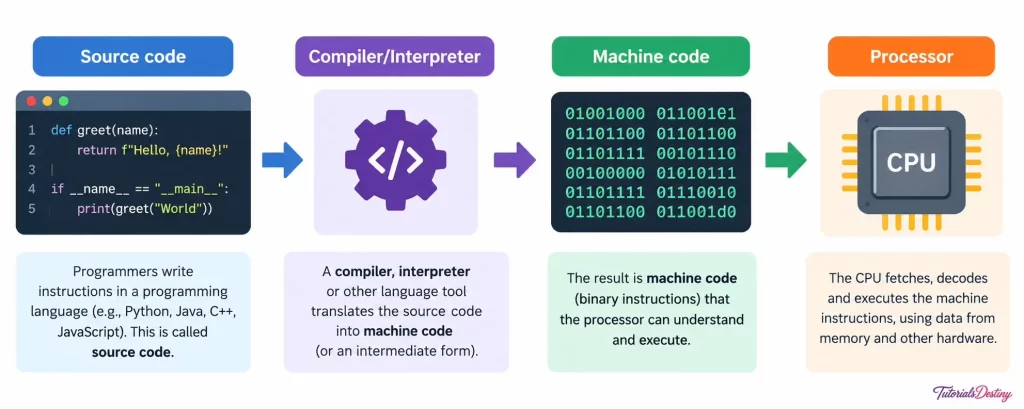
Programmers write software in a programming language such as Python, Java, C++, or JavaScript. The text they write is called source code. It is designed to be readable by people, but a processor can execute only machine code, which consists of binary patterns of 0s and 1s. A translator program therefore converts one into the other:
- A compiler translates the entire source code into machine code in advance, producing a ready-to-run file (as with C and C++).
- An interpreter reads and executes the code step by step as the program runs (as with Python and JavaScript).
- An assembler converts assembly language, a low-level language that maps closely to machine instructions, into machine code.
When you double-click an application, the operating system copies the program from storage (a hard drive or SSD) into main memory (RAM). The processor then repeats a simple cycle at enormous speed: fetch the next instruction, decode what it means, and execute it. Billions of these cycles happen every second, which is how a long list of tiny steps adds up to a smooth video call or a fast game.
Main Types of Software
Software is traditionally divided into two main types. System software runs and manages the computer itself. Application software helps the user perform specific tasks. A helpful way to picture it is as layers, with the user at the top and the hardware at the bottom:
User → Application software → System software (operating system) → Hardware
| Feature | System software | Application software |
|---|---|---|
| Purpose | Manages the hardware and provides a platform for other software | Performs specific tasks for the user |
| Dependence | Works directly with the hardware | Depends on system software to run |
| Visibility | Mostly works in the background | Used directly by the user |
| Installed | Usually first, often pre-installed | As and when needed |
| Examples | Windows, Linux, drivers, antivirus, BIOS | Word processor, browser, media player, games |
📷 Suggested image (infographic): a tree diagram with “Software” at the top, branching into “System software” and “Application software”, each with its sub-types. Alt text: “Classification of computer software into system and application software”.
System Software
System software is essential for the operation of any computer. It controls the processor, memory, storage, and devices, and it provides the platform on which every other program runs. Because it works so close to the hardware, it is typically written in languages such as C, C++, and assembly. The main kinds are operating systems, device drivers, utility programs, language translators, and firmware.
Operating System (OS)
The operating system is the most important piece of system software. It starts when the computer is switched on, stays in charge while it runs, and acts as the go-between for the user, the applications, and the hardware. Its core responsibilities are:
- Process management: deciding which programs get the processor and for how long, so many programs seem to run at once.
- Memory management: giving each program RAM and taking it back when the program ends.
- File management: organizing data into files and folders.
- Device management: controlling printers, displays, keyboards, and other peripherals through drivers.
- User interface: offering a graphical interface (GUI) or a command line.
- Security: managing user accounts, passwords, and permissions.
Operating systems come in several kinds, depending on the device and its job:
| Kind | Used on | Examples |
|---|---|---|
| Desktop OS | Personal computers and laptops | Windows, macOS, Linux |
| Mobile OS | Smartphones and tablets | Android, iOS |
| Server OS | Servers that host websites and services | Windows Server, Linux distributions |
| Embedded OS | Appliances, smart TVs, routers | Embedded Linux, vendor-specific systems |
| Real-time OS (RTOS) | Machines needing guaranteed response times, such as medical and industrial controllers | FreeRTOS, VxWorks |
Some operating systems are commercial products, while others are free and open source. Strictly speaking, Linux is a kernel (the core of an OS), and complete systems built around it, such as Ubuntu, Fedora, and Debian, are called distributions.
📷 Suggested image: a layered diagram with the OS sitting between applications and hardware, or a row of the Windows, macOS, Linux, Android, and iOS logos. Alt text: “Popular operating systems”.
Device Drivers
A device driver is a small program that lets the operating system communicate with a particular piece of hardware. Every device has its own way of working, and the driver translates between the device and the OS. For example, if you fit a new graphics card (GPU) but never install its driver, the computer may show only a basic picture, and the card’s full power stays locked until the correct driver is installed. Drivers come from the manufacturer’s website, through OS updates, or on a disc, and many modern devices are plug and play, meaning the OS installs the driver automatically.
Utility Software
Utility software helps to maintain, protect, and optimize the system. Many utilities are bundled with the OS, while others can be downloaded, and installing them usually needs administrator rights. Common examples include:
- Antivirus and security tools that detect and remove malware.
- Disk cleanup tools that delete temporary files to free space.
- Backup and data-recovery tools that copy files and help restore lost ones.
- Defragmenters that tidy scattered file pieces on a hard disk drive (HDD). They are not needed for solid state drives (SSDs).
- File compression tools such as 7-Zip and WinRAR that create smaller archive files.
- Task managers that show running programs and resource use.
Firmware
Firmware is permanent software stored on a chip inside a hardware device. The best-known example is the BIOS or UEFI on the motherboard, which wakes up the hardware when you press the power button and then hands control to the operating system. Routers, printers, smart TVs, and washing machines all run on firmware, which can sometimes be updated by the manufacturer.
Application Software
Application software, usually called an app, is designed to help the user perform a specific task such as writing a letter, editing a photo, or joining a video call. Applications do not control the hardware directly; they ask the operating system for memory, storage, and access to devices. Applications fall into many categories:
| Category | What it is used for | Examples |
|---|---|---|
| Productivity | Documents, calculations, presentations, notes, tasks | Microsoft Word and Excel, Google Docs, Notion, Trello |
| Web browsers | Viewing websites and web apps | Chrome, Firefox, Edge, Safari |
| Communication | Email, chat, calls, video meetings | Gmail, WhatsApp, Zoom, Microsoft Teams |
| Multimedia | Playing and editing audio, images, video, animation | VLC, Photoshop, Audacity, Blender |
| Educational | Teaching, learning, and online courses | Google Classroom, Moodle, Duolingo, Khan Academy |
| Gaming | Playing, building, and streaming games | Unity, Unreal Engine, Steam, OBS Studio |
| Business | Accounting, payroll, inventory, customer management | Tally, QuickBooks, SAP |
| Database | Storing and querying large amounts of data | MySQL, PostgreSQL, Microsoft Access |
| Development tools | Writing, testing, and debugging code | Visual Studio Code, IntelliJ IDEA, Git |
📷 Suggested image (collage): a grid of app icons grouped by category (productivity, browsers, communication, multimedia, education, gaming). Alt text: “Common categories of application software”.
Productivity Software
Productivity software helps people get more done in less time. It includes word processors for documents, spreadsheets for calculations and charts, presentation software for slides, note-taking apps, and task managers. These tools are often sold together as an office suite such as Microsoft 365, Google Workspace, or the free, open-source LibreOffice.
Web Browsers
A web browser requests web pages from servers and displays them, interpreting the HTML (structure), CSS (appearance), and JavaScript (behaviour) they contain. Modern browsers add tabs, bookmarks, password managers, extensions, and private browsing, and they now run full applications such as email and document editors.
Multimedia, Educational, Gaming, and Communication Software
Multimedia software plays and edits audio, images, video, and 3D graphics. Educational software includes learning management systems, online course platforms, language apps, and simulators that make remote learning possible. Gaming software covers games, the engines used to build them, the platforms that sell them, and tools that record or stream gameplay. Communication software lets people call, message, email, and hold video meetings, and collaboration platforms combine all of these with shared files.
General-Purpose vs Custom Software
Applications can also be classed by who they are made for. General-purpose software, such as a word processor, is built for many kinds of users. Custom (bespoke) software is built for one organization to fit its exact needs, such as a bank’s internal transaction system or a hospital’s patient-records platform. Custom software costs more to create but fits the work perfectly.
Software Licensing
Software is protected by copyright, and a license defines what you are allowed to do with it. The common models are:
| Type | Meaning | Examples |
|---|---|---|
| Proprietary | Owned by a company; you pay to use it and cannot modify its code | Windows, Adobe Photoshop, Microsoft Office |
| Open source | Source code is public; you may use, study, change, and share it under the license | Linux, Firefox, VLC, LibreOffice, Blender |
| Freeware | Free to use, but the code is usually closed | Discord, Adobe Acrobat Reader, Google Chrome |
| Shareware / trial | Free to try for a time or with limited features, then paid | Trial versions of many editing and security tools |
| Subscription (SaaS) | Paid monthly or yearly for continued use | Microsoft 365, Google Workspace, Adobe Creative Cloud |
“Free” and “open source” are not the same. Open source is about the freedom to see and change the code, and it is often, but not always, free of charge. Using pirated copies of paid software is illegal, and cracked programs frequently contain malware.
How Software Is Delivered
- Desktop applications are installed on your computer and run locally, such as a video editor.
- Web applications run in your browser while the heavy work is done on a server, such as Gmail. Nothing needs to be installed.
- Mobile apps are downloaded from an app store such as Google Play or the Apple App Store.
- Software as a Service (SaaS) is software hosted in the cloud and rented by subscription, so the provider handles updates, storage, and maintenance.
📷 Suggested image: a laptop, phone, and cloud icon connected to each other, labelled “Desktop”, “Mobile”, and “Web/Cloud”. Alt text: “Ways software is delivered to users”.
How Software Is Built: The Development Life Cycle
Professional software is created through a structured process known as the Software Development Life Cycle (SDLC). Its main stages are:
- Planning: deciding what problem the software will solve, and the time and budget available.
- Requirement analysis: collecting exactly what users need the software to do.
- Design: planning the structure, screens, and data of the software.
- Coding: writing the source code.
- Testing: hunting for bugs (errors) and checking that the software meets the requirements.
- Deployment: releasing the software to users.
- Maintenance: fixing problems and adding features over time.
Teams may follow these stages in a strict sequence (the waterfall model) or in short repeating cycles (agile methods), releasing a little at a time and improving from feedback.
📷 Suggested image (diagram): a circular chart of the seven SDLC stages. Alt text: “Stages of the software development life cycle”.
Versions, Updates, and Patches
Software is rarely finished. Developers release versions, usually numbered, such as 2.1.4. A change in the first number normally signals a major release with big new features, the middle number a smaller feature update, and the last number a minor fix. A patch is a small update that repairs a bug or closes a security hole. Early test builds are often called alpha and beta versions. Keeping software up to date is one of the most effective ways to stay secure, because attackers target known weaknesses that updates have already fixed.
Malware: Software Designed to Harm
Not all software is helpful. Malware is software written to damage a system or steal information. Common kinds include:
- Virus: attaches itself to other files and spreads when they are shared.
- Worm: spreads automatically across networks without needing a host file.
- Trojan: pretends to be a useful program while doing harm secretly.
- Ransomware: locks or encrypts your files and demands payment to release them.
- Spyware: secretly records what you do and sends it to someone else.
Tips for Using Software Safely
- Download software only from official websites and app stores.
- Keep your operating system and applications updated.
- Use a trusted antivirus tool and a firewall.
- Avoid pirated software and unknown email attachments.
- Back up important files regularly, on more than one device.
- Read what permissions an app asks for before you allow them.
Practice Questions
- Define computer software and explain how it differs from hardware.
- What is the difference between a compiler and an interpreter?
- List four functions of an operating system.
- Why does a new graphics card need a driver?
- Classify as system or application software: Ubuntu, VLC, BIOS, Zoom, antivirus, Excel.
- What is the difference between open-source software and freeware?
- Name the stages of the software development life cycle.
- What is ransomware, and how can you protect yourself from it?
Show answers
- Software is a set of instructions (programs) that tells a computer what to do and has no physical form. Hardware is the physical equipment, such as the processor, memory, and screen.
- A compiler translates the whole program into machine code before it runs; an interpreter translates and executes it line by line.
- Any four of: process management, memory management, file management, device management, user interface, security.
- The driver lets the operating system communicate with the card; without it, the card’s full features are not available or it does not work.
- System: Ubuntu, BIOS, antivirus. Application: VLC, Zoom, Excel.
- Open-source software has public source code that you may study and modify; freeware is free to use but usually keeps its code closed.
- Planning, requirement analysis, design, coding, testing, deployment, and maintenance.
- Ransomware is malware that locks or encrypts files and demands payment. Protect yourself by keeping regular backups, updating software, using antivirus, and avoiding suspicious links and attachments.
Key Takeaways
- Software is the set of instructions that makes hardware useful, and it must be translated into machine code before the processor can run it.
- System software (operating systems, drivers, utilities, translators, firmware) manages the computer; application software helps users perform tasks.
- Licensing decides your rights: proprietary, open source, freeware, shareware, or subscription.
- Software is built in stages, from planning to maintenance, and is improved through versions and patches.
- Malware is a real risk, so update regularly, download from trusted sources, and back up your data.
Conclusion
Hardware gives a computer its power, but software gives it purpose. System software quietly manages the machine and connects it to every device, while application software lets you write, browse, learn, create, and communicate. Knowing how software works, how it is classified, licensed, built, and kept secure helps you choose the right tools, avoid common risks, and prepare for deeper topics such as operating systems and programming.
For more tutorials on this topic, visit TutorialsDestiny.